iDRAC9: Securing Virtual Console with Transport Layer Security version 1.2
Summary: This article outlines how to complete certain steps which are required to enable this restriction on iDRAC9.
This article applies to
This article does not apply to
This article is not tied to any specific product.
Not all product versions are identified in this article.
Instructions
With a continued focus on network security within the data center, iDRAC9 now can restrict the Virtual Console sessions to support Transport Layer Security (TLS) version 1.2 cryptography only. This article outlines how to complete certain steps which are required to enable this restriction on iDRAC9.
Table of Contents
1. Prerequisites
- iDRAC9 firmware 4.40.00.00 or newer
- Enabling Web Redirection on Virtual Console
- Virtual Console Plugin = HTML5
- Restricting iDRAC webserver to TLS 1.2 protocol
NOTE: For an additional layer of security, client web browsers should be restricted to the TLS 1.2 protocol as well.
iDRAC9 firmware 4.00.00.00 introduced a new feature called Virtual Console Web Redirection. By default, the iDRAC Virtual Console uses the remote presence port 5900. When Virtual Console Web Redirection is enabled, the Virtual Console viewer leverages the defined webserver port for the iDRAC9. By default, the iDRAC webserver uses port 443 for https traffic. The virtual console can take advantage of the defined TLS protocol restrictions on the webserver port by establishing the virtual console session through the webserver port. HTML5 plugin type is the only Virtual Console plugin to support the redirection feature. When this feature was originally introduced, the remote presence port was left open while ignoring any traffic to the port. iDRAC9 4.40.00.00 introduced an additional feature to close this unused port when wed redirection is enabled.
NOTE: iDRAC9 4.40.00.00 introduced the eHTML5 virtual console plugin. The eHTML5 plugin uses the iDRAC9 webserver port without any additional configuration required.
2. Restrict Webserver to TLS 1.2 protocol
Virtual Console Web Redirection is only configurable throughracadm command-line interface. All the steps outlined can be input using an SSH terminal session or using the racadm utility (DRACTOOLS) remotely.
Use the
set command to define the iDRAC Webserver TLS Protocol. In this case, the value of 2 equals Only TLS 1.2.
racadm set iDRAC.Webserver.TLSProtocol 2
racadm>>racadm set iDRAC.Webserver.TLSProtocol 2
[Key=iDRAC.Embedded.1#WebServer.1]
Object value modified successfully
Use the get command to confirm the iDRAC Webserver settings.
racadm get iDRAC.Webserver
racadm>>racadm get iDRAC.Webserver
[Key=iDRAC.Embedded.1#WebServer.1]
CustomCipherString=
Enable=Enabled
HttpPort=80
HttpsPort=443
HttpsRedirection=Enabled
#MaxNumberOfSessions=8
SSLEncryptionBitLength=Auto-Negotiate
Timeout=1800
TitleBarOption=Auto
TitleBarOptionCustom=
TLSProtocol=TLS 1.2 Only
3. Configure Virtual Console Settings
Use the set command to define the iDRAC Virtual Console Plugin. In this case, the value of "2" equals HTML5:
racadm set iDRAC.VirtualConsole.PluginType 2
racadm>>racadm set iDRAC.VirtualConsole.PluginType 2
[Key=iDRAC.Embedded.1#VirtualConsole.1]
Object value modified successfully
Use the set command to enable iDRAC Virtual Console Web Redirection.
racadm set iDRAC.VirtualConsole.WebRedirect Enabled
racadm>>racadm set iDRAC.VirtualConsole.WebRedirect Enabled
[Key=iDRAC.Embedded.1#VirtualConsole.1]
Object value modified successfully
Use the set command to close the unused remote presence port.
racadm set iDRAC.VirtualConsole.CloseUnusedPort Enabled
racadm>>racadm set iDRAC.VirtualConsole.CloseUnusedPort Enabled
[Key=iDRAC.Embedded.1#VirtualConsole.1]
Object value modified successfully
Use the get command to confirm the iDRAC Virtual Console settings.
racadm get iDRAC.VirtualConsole
racadm>>racadm get iDRAC.VirtualConsole
[Key=iDRAC.Embedded.1#VirtualConsole.1]
AccessPrivilege=Deny Access
#ActiveSessions=0
AttachState=Auto-attach
CloseUnusedPort=Enabled
Enable=Enabled
EncryptEnable=Enabled
LocalDisable=Disabled
LocalVideo=Enabled
MaxSessions=6
PluginType=2
Port=5900
Timeout=1800
TimeoutEnable=Disabled
WebRedirect=Enabled
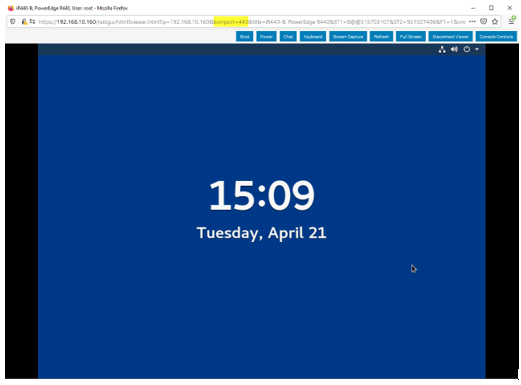
With the highlighted settings in place, the iDRAC Virtual Console now establishes HTML5 sessions through a webserver port with the TLS 1.2 protocol restriction. The address bar of the console viewer displays the port in use.
Affected Products
iDRAC9Article Properties
Article Number: 000129738
Article Type: How To
Last Modified: 19 Apr 2026
Version: 8
Find answers to your questions from other Dell users
Support Services
Check if your device is covered by Support Services.