PowerStore:出现警告时,运行状况检查显示所有绿色
Summary: 出现警告时,运行状况检查显示全绿。
This article applies to
This article does not apply to
This article is not tied to any specific product.
Not all product versions are identified in this article.
Symptoms
在所有当前版本的 PowerStoreOS 中,升级和运行状况检查并不总是清晰的,如从 PowerStore Manager (UI) 中看到的那样。
在 PowerStore 上运行升级前运行状况检查 (PUHC) 或升级时,该过程将检查系统的运行状况。虽然 PUHC 有效,但它并不总是以易于注意的方式报告问题。
以下是 设置>升级屏幕 的视图。% Complete / Status 列显示绿色复选标记,这似乎表示一切正常。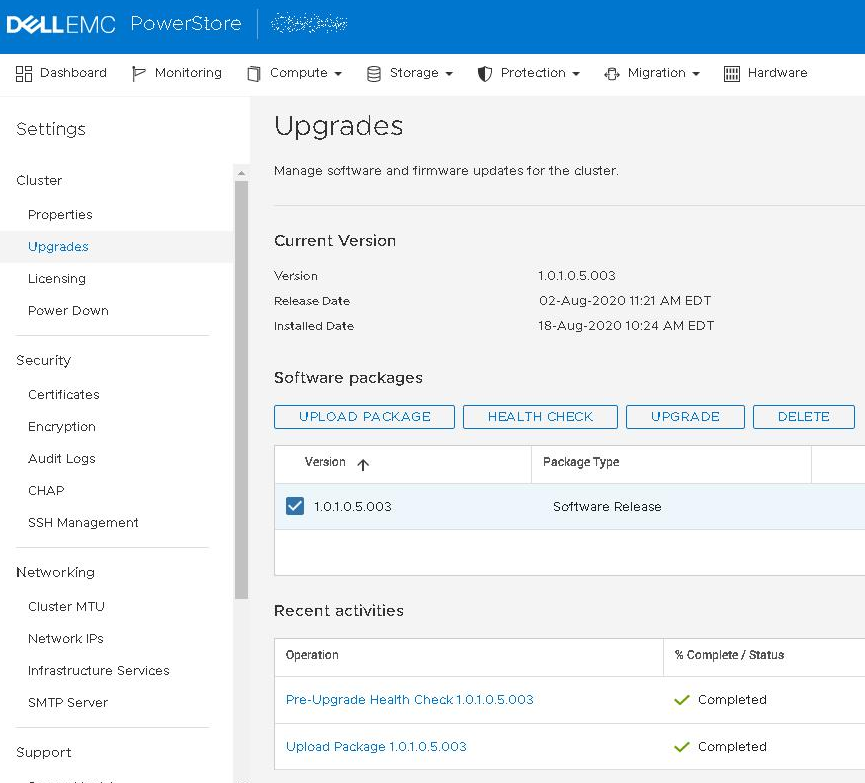
作业详细信息中的示例:
您可以看到运行状况检查执行的所有步骤,所有内容均显示绿色检查。
要查看完整详细信息,请突出显示其中一个步骤,例如 运行状况检查 - 节点 A: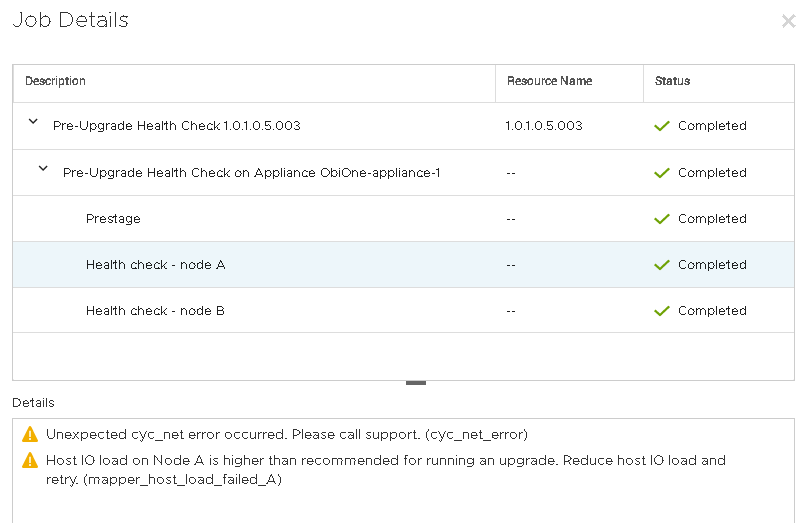
现在,您可以看到系统有两个警告。
在继续升级之前,应解决所有警告。
在此示例中,存在 cyc_net 错误和 主机 IO 加载 错误。
- 一个错误很简单。在执行升级之前,我们应该等待较低的 I/O(或维护窗口)。
- 第二个错误需要进行故障处理。
从服务控制台执行 PUHC 检查
从命令行中看到的相同 PUHC 中的示例:
Jun 16 18:18:47 xxxxxxx-A cyc_puhc[62722]: Checking Active Imports..................................... OK
Jun 16 18:18:47 xxxxxxx-A cyc_puhc[62722]: Check : Checking network connection configuration
Jun 16 18:18:47 xxxxxxx-A cyc_puhc[62722]: Warning : Appliance nodes are not connected to the same switches (247390384816168)
Jun 16 18:18:47 xxxxxxx-A cyc_puhc[62722]: Action : Please make sure the nodes in the appliance are connected to the same ToR switches
Jun 16 18:18:47 xxxxxxx-A cyc_puhc[62722]: Check : Checking network connection configuration
Jun 16 18:18:47 xxxxxxx-A cyc_puhc[62722]: Warning : Appliance nodes are not connected to the same switches (247390384816168)
Jun 16 18:18:47 xxxxxxx-A cyc_puhc[62722]: Action : Please make sure the nodes in the appliance are connected to the same ToR switches
Jun 16 18:18:47 xxxxxxx-A cyc_puhc[62722]: Check : Checking if system cpu usage is normal
Jun 16 18:18:47 xxxxxxx-A cyc_puhc[62722]: Warning : CPU utilization level too high (247390385274892)
Jun 16 18:18:47 xxxxxxx-A cyc_puhc[62722]: Action : Reduce system load prior to NDU
Jun 16 18:18:47 xxxxxxx-A cyc_puhc[62722]: Check : Checking for Mapper status
Jun 16 18:18:47 xxxxxxx-A cyc_puhc[62722]: Warning : Host IO load on Node A is higher than recommended for running an upgrade (247390384816199)
Jun 16 18:18:47 xxxxxxx-A cyc_puhc[62722]: Action : Reduce host IO load and retry
与 UI 不同,警告和网络错误会在命令行中详细显示。
系统允许用户升级警告级别错误(但不显示错误或严重级别消息),无论是否看到这些警告。
Cause
绿色复选标记用于指示步骤本身已完成运行。此问题被发现令人困惑,将在未来版本中修复。
Resolution
修复
此问题的修复将在 PowerStoreOS 的未来版本中提供。
临时解决方法
方法 1
确保一直向下单击群集中所有设备上的 “Health check - node A” 和“ Health check - node B ”。请在执行任何升级之前执行此步骤。
方法 2
从命令行观察 PUHC。
以下命令使您可以实时查看运行状况检查是否存在任何问题。观察到的任何事情都应该得到解决。
svc_journalctl -t cyc_puhc -f
选择以下命令之一以查看上次执行的 PUHC。
svc_journalctl -t cyc_puhc -r
--或者--
svc_journalctl -t cyc_puhc -rg "Warning"
提醒:使用“警告”作为搜索词的命令版本将创建更短的 CLI 输出,但可能会遗漏“信息”级别的消息。
CLI 还会显示有关遇到的任何错误的更多详细信息。
- 如果未观察到警告,则可以继续。
- 如果观察到警告,请在继续之前解决它们。
Affected Products
PowerStore, PowerStore Employee and PartnerArticle Properties
Article Number: 000130130
Article Type: Solution
Last Modified: 10 Oct 2025
Version: 7
Find answers to your questions from other Dell users
Support Services
Check if your device is covered by Support Services.