Windows 10 정품 인증 오류 코드 0xC004C008
Summary: Dell에서 받은 새 시스템에서 Windows 10 정품 인증 오류 코드 0xC004C008 문제
This article applies to
This article does not apply to
This article is not tied to any specific product.
Not all product versions are identified in this article.
Symptoms
N/A
Cause
N/A
Resolution
이 문서의 지침에 따라 처음 시스템 정품 인증 시 Windows 10 정품 인증 오류 코드 0xC004C008(제품 키가 이미 사용 중)을 해결합니다.
오류 코드 0xC004C008
Dell에서 받은 새 시스템에서 Windows 10 정품 인증 문제가 발생할 수 있습니다. 초기 시스템 부팅 시 다음 오류가 나타날 수 있습니다(그림 1).
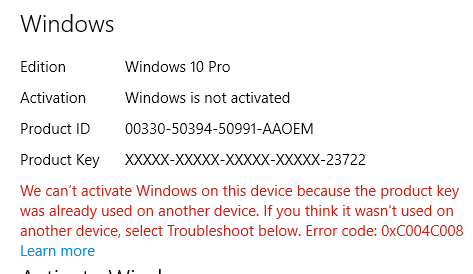
그림 1: 제품 키가 이미 사용 중이라는 Windows 10 정품 인증 오류
이 오류는 정품 인증 서버가 Windows 10 제품 키가 여러 개인용 컴퓨터에서 사용되었을 수 있음을 발견하여 발생합니다. Windows 8.1 또는 Windows 10 운영 체제 제품을 특정 횟수만큼 설치하면 Windows 8.1 또는 Windows 10 라이선스를 단일 디바이스에만 설치할 수 있기 때문에 오류 코드가 0xC004C008 나타납니다.
해결책
 참고: 일부 정품 인증 오류는 몇 번의 시스템 재부팅을 수행한 다음 정품 인증 시퀀스를 다시 시도하면 해결됩니다. 참조: Microsoft Windows IT Center 문서: Windows 10 버전 업그레이드
정품 인증 문제 해결사를 확인하여 이 문제를 해결할 수도 있습니다. 문제 해결사는 OA3(OEM 정품 인증 프로세스 3.0)에 필요한 업데이트를 신속하게 다운로드합니다.
문제가 계속 발생하면 정품 인증 화면에 나열된 지원 번호(예: 1-800-936-5700"으로 전화하십시오.) 그리고 수신한 오류 메시지가 새 Dell 컴퓨터에 있음을 설명합니다.
Microsoft는 전화 정품 인증을 제공할 수 있습니다.
Affected Products
Alienware, Inspiron, Legacy Desktop Models, OptiPlex, Vostro, XPS, G Series, G Series, Alienware, Inspiron, Latitude, Vostro, XPS, Legacy Laptop Models, Fixed Workstations, Mobile WorkstationsArticle Properties
Article Number: 000130292
Article Type: Solution
Last Modified: 17 Jul 2025
Version: 6
Find answers to your questions from other Dell users
Support Services
Check if your device is covered by Support Services.