How to Import Foreign Configuration after Motherboard replacement - LSI SAS 3008 RAID Controller
Summary: Find out the cause and resolution of a Foreign Configuration after a motherboard replacement in a system containing an LSI 3008 SAS RAID Controller card.
This article applies to
This article does not apply to
This article is not tied to any specific product.
Not all product versions are identified in this article.
Symptoms
-
Cause
-
Resolution
This article details the cause of a Foreign Configuration after a motherboard replacement in select systems.
Description
A foreign configuration usually refers to a RAID configuration that already exists on a replacement set of drives installed in a system. However, a foreign configuration can also occur when other system hardware components are replaced. This article deals specifically with the foreign configuration that occurs when the motherboard of a PowerEdge system, which includes an LSI SAS 3008 RAID Controller as a component.Solution
In this instance, to resolve the foreign configuration, it is necessary to import. Please follow the steps below to resolve the issue: Note: In line with best practice, always ensure that your data is backed up and secure before attempted any procedures associated with RAID arrays.
- Log in to the Manage Foreign Configuration screen.
- On the main screen, select Main Menu and press Enter.
- Select Configuration Management and press Enter.
- Select Manage Foreign Configuration and press Enter.
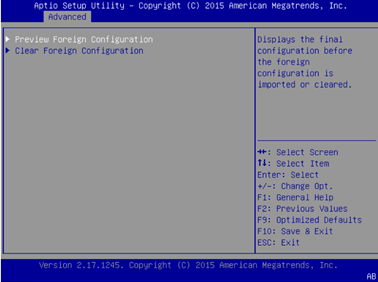
Figure 1: Manage Foreign Configuration screen is displayed
- Select Preview Foreign Configuration and press Enter. The existing foreign configuration is displayed.
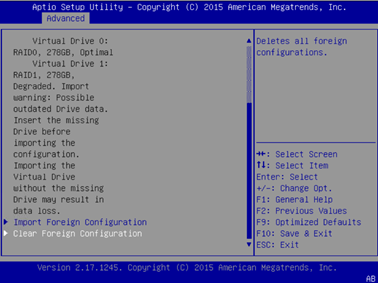
Figure 2: Existing Foreign Configuration
- Select Import Foreign Configuration and press Enter.
- A confirmation screen is displayed.
- Select Confirm and press Enter.
- Select Enable and press Enter.
- Select Yes and press Enter.
- The message "The operation has been performed successfully" is displayed.
- Select OK on the success message to finish the configuration and return to the previous screen.
 Note: This example can also occur if physical drives are moved from one server to another.
 Note: Importing a foreign configuration should only ever be used in the event of multiple drives being marked foreign simultaneously and only when an array is offline.
Article Properties
Article Number: 000130320
Article Type: Solution
Last Modified: 23 Sep 2021
Version: 4
Find answers to your questions from other Dell users
Support Services
Check if your device is covered by Support Services.