Dell Encryption Removal Agent gets stuck
Summary: This article provides a resolution when the Encryption Removal Agent gets stuck.
This article applies to
This article does not apply to
This article is not tied to any specific product.
Not all product versions are identified in this article.
Symptoms
Affected Products:
- Dell Encryption
- Dell Data Protection | Encryption
Cause
Not Applicable
Resolution
The encryption Removal Agent is no longer processing encrypted data.
Encryption Removal Agent status
The Dell Encryption removal agent goes through several phases before reaching a Complete status. When this final phase is reached, decryption is complete, and the FFE driver and the agent are removed.
The encryption removal agent goes through the following steps, and "Decrypt on Reboot [partial]" may be seen several times. This depends on the ability of the Dell Encryption Removal agent to access encrypted data.
- Decrypt
- Decrypt on reboot [partial].
- Decrypt
- Decrypt on reboot.
- Decrypt
- Complete
Waiting for Deactivation
Dell Encryption is still installed, is still configured, or both. Decryption does not start until Dell Encryption is uninstalled.
Initial sweep
The Service is making an initial sweep, calculating the number of encrypted files and bytes. The initial sweep occurs one time.
Decryption sweep
The Service is decrypting files and possibly requesting to decrypt locked files.
Decrypt on Reboot (partial)
The decryption sweep is complete and some locked files (but not all) are to be decrypted on the next restart.
Decrypt on Reboot.
The decryption sweep is complete and all locked files are to be decrypted on the next restart.
All files could not be decrypted.
The decryption sweep is complete, but all files could not be decrypted. This status means one of the following occurred:
- The locked files could not be scheduled for decryption because they were too big, or an error occurred while making the request to unlock them.
- An I/O error occurred while decrypting files.
- The files could not be decrypted by policy.
- The files are marked as should be encrypted.
- An error occurred during the decryption sweep.
The steps that are indicated below may assist with computers that are continuously reporting All files could not be decrypted state.
Complete
The decryption sweep is complete. The Service, the executable, the driver, and the driver executable are all scheduled for deletion on the next restart.
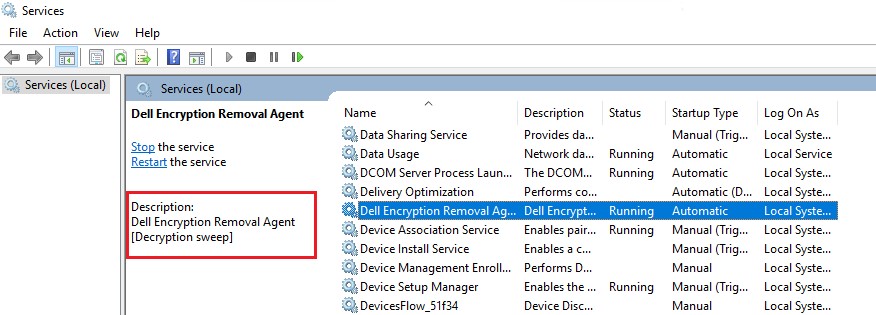
Start Menu > Type services and click services > Look for Encryption Removal Agent. The area in the red box has the status of the agent.
Registry Option
Warning: The next step is a Windows Registry edit:
- Back up the Registry before proceeding, reference How to Back Up and Restore the Registry in Windows
.
- Editing the Registry can cause the computer to become unresponsive on the next reboot.
- Contact Dell Data Security International Support Phone Numbers for assistance if you have concerns about performing this step.
Try to add the below registry key to see if it can help decrypt the files that are based on their size. Commonly one of the files that stops responding is the software hive. A client drop of 8.5.0.6928 was made to help prevent this issue for future releases.
- Start Menu > Regedit.exe > Change the following DWORD 32-Bit value to 0:
[HKEY_LOCAL_MACHINE\SOFTWARE\Credant\DecryptAgent]"MaxBytesReboot"=dword:00000000
- Reboot the computer.
- The encryption removal agent should now continue the decryption process.
CMGAu.exe Option
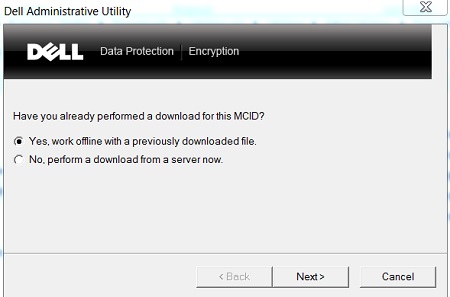
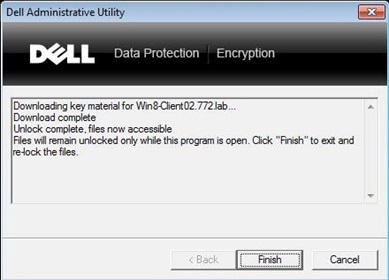
If the encryption removal agent is not processing all encrypted data on the computer, CMGAu.exe can be used to mount the encryption keys to ensure that all available key data is available to the Dell Encryption Removal Agent. It is required to keep the unlocked window open in the background.
- Run
CMGAu.exeand choose the appropriate option.
Logs
If the encryption removal agent is still not processing encrypted files, it may be necessary to check logs to determine what file the agent is having trouble with.
- Go to
C:\ProgramData\Dell\Dell Data Protection\Encryption - Open the
CmgDecryptAgent.logand scroll to the bottom of this log - Check the file and plan a course of action
The following registry key is required on some versions of the Dell Encryption Removal Agent to generate the CmgDecryptAgent.log:
[HKEY_LOCAL_MACHINE\SOFTWARE\Credant\DecryptAgent] LogVerbosity=REG_DWORD:15
Example log excerpt for a missing key
[08.25.15 13:06:19] CopyFile::Copy(): Error opening "<C:\Users\<Username>\AppData\Local\Google\Chrome\User Data\Default\Pepper Data\Shockwave
Flash\WritableRoot\#SharedObjects\7DT5DRTL\macromedia.com\support\fla shplayer\sys\#de-ipd.cdn.videoplaza.tv\CEFD987.settings.sol.TMP>" for reading, win32Err = 5

[08.25.15 13:06:19] SDS::DecryptSweep(): Access denied, retrying with backup semantics: "<C:\Users\<Username>\AppData\Local\Google\Chrome\User Data\Default\Pepper Data\Shockwave
Example log excerpt for no file handle
[04.21.15 09:22:06] SDS::ScheduleForDecrypt(): File to be decrypted on reboot: "C:\Windows\System32\config\SOFTWARE" [SDE]

[04.21.15 09:22:06] SDS::DecryptSweep(): File locked, can't decrypt: "C:\Windows\System32\config\SOFTWARE.LOG1" [SDE]

[04.21.15 09:22:06] SDS::DecryptSweep(): File locked, can't decrypt: "C:\Windows\System32\config\SOFTWARE.LOG2" [SDE]
These messages indicate that the file is in-use and has been scheduled to be decrypted on the next reboot cycle. Unlocking the keys with the CMGAu process above and restarting the Dell Encryption Agent Service may help with decrypting these files without requiring a reboot.
To contact support, reference Dell Data Security International Support Phone Numbers.
Go to TechDirect to generate a technical support request online.
For additional insights and resources, join the Dell Security Community Forum.
Affected Products
Dell EncryptionArticle Properties
Article Number: 000131047
Article Type: Solution
Last Modified: 26 Jun 2026
Version: 13
Find answers to your questions from other Dell users
Support Services
Check if your device is covered by Support Services.