Precision 3541: Näppäimistön toiminto-opas
Summary: Seuraavissa ohjeissa luetellaan Precision 3541 Mobile Workstation -työaseman käytettävissä olevat pikanäppäimet ja niiden toiminnot.
This article applies to
This article does not apply to
This article is not tied to any specific product.
Not all product versions are identified in this article.
Symptoms
Näppäimistön pikanäppäintoiminnot
Seuraavassa taulukossa esitellään Precision 3541 Mobile Workstation -työaseman näppäimistön pikanäppäintoiminnot.
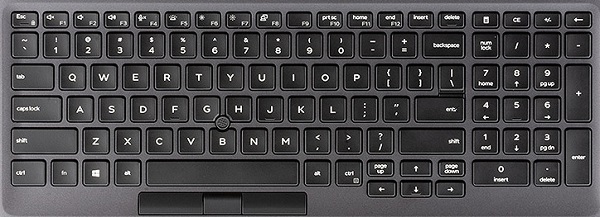
Cause
| Toimintonäppäinyhdistelmä | Tulos |
|---|---|
| Fn + Esc | Ota Fn-näppäinlukitus käyttöön tai poista se käytöstä |
| Fn + F1 | Mykistä äänet |
| Fn + F2 | Vähennä äänenvoimakkuutta |
| Fn + F3 | Lisää äänenvoimakkuutta |
| Fn + F4 | Mykistä mikrofoni |
| Fn + F5 | Näppäimistön taustavalon asentaminen /poistaminen käytöstä (valinnainen) |
| Fn + F6 | Lisää LCD-näytön kirkkautta |
| Fn + F7 | LCD-näytön kirkkauden vähentäminen |
| Fn + F8 | Näytön vaihtaminen |
| Fn + F10 | PrntScr |
| Fn + F11 | Home |
| Fn + F12 | End |
| Fn + Ctrl | Avaa sovellusvalikko |
| Fn + B | Pause/Break |
Resolution
 Lisätietoja saat näppäimistön tietämyskannasta.
 Lisätietoja on kosketuslevyn tukisivulla.
 Lisää artikkeleita ja tietoja on myös Hiiren tukisivulla.
Affected Products
Precision 3541Article Properties
Article Number: 000131096
Article Type: Solution
Last Modified: 25 Sep 2023
Version: 5
Find answers to your questions from other Dell users
Support Services
Check if your device is covered by Support Services.