Ingen startafbildning Indlæsning af statuslinje ved opstart fra PXE til implementering af operativsystem vha. Windows-implementeringstjeneste
Summary: Denne artikel forklarer, hvordan du får indlæsningsstatuslinjen til at vise, når PXE starter for at udrulle et operativsystem med Windows Deployment Service.
This article applies to
This article does not apply to
This article is not tied to any specific product.
Not all product versions are identified in this article.
Symptoms
Der vises ingen statuslinje for indlæsning
Når du kører PXE-opstart i Windows Implementeringstjenesten for at installere et operativsystem, kan du muligvis ikke se en statuslinje for indlæsning. Dette skyldes, at wdsmgfw.efi på nogle PXE-servere skifter til wgl4-skrifttypen uden at bruge den korrigerede opløsning fra bootmgr.efi.
Det fører til, at skærmen vises forkert, mens filerne indlæses fra wdsmgfw.efi. Så mens opstartsbilledet indlæses, vises indlæsningsstatuslinjen ikke som forventet (figur 1 og 2).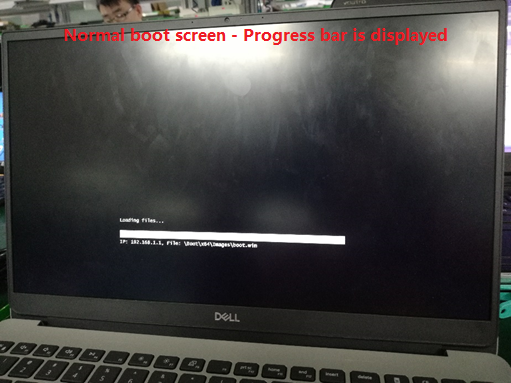
Figur 1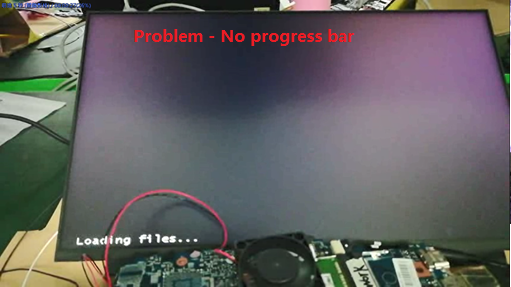
Figur 2
Berørte systemer:
- Inspiron 5402
- Inspiron 5409
- Inspiron 7500
- Inspiron 7501
- Inspiron 5502
- Inspiron 5509
- Latitude 3410
- Latitude 3510
- Vostro 5402
- Vostro 5502
- Vostro 7500
Cause
Ingen oplysninger om årsag
Resolution
For at løse dette problem skal du fjerne skrifttypefilen "wgl4_boot.ttf" under "Boot\Fonts" som indeholder opstartsbilledet til WDS.
Hvis du har flere spørgsmål om denne artikel, skal du kontakte Dells tekniske support.
Affected Products
Inspiron 7500, Inspiron 7501, Latitude 3410, Latitude 3510, Vostro 7500Article Properties
Article Number: 000132044
Article Type: Solution
Last Modified: 22 Apr 2025
Version: 5
Find answers to your questions from other Dell users
Support Services
Check if your device is covered by Support Services.