PowerStore:通过 SSH 连接时出现身份验证方法错误
Summary: 本文提供了建立与 PowerStore 节点的 SSH 连接时遇到的问题的解决方案。
This article applies to
This article does not apply to
This article is not tied to any specific product.
Not all product versions are identified in this article.
Symptoms
使用 SSH 连接到 PowerStore 节点时,您可能会遇到以下错误之一:
- No supported authentication methods available (server sent: publickey,gssapi-keyex,gssapi-with-mic)
- 权限被拒绝(publickey,gssapi-keyex,gssapi-with-mic)
示例: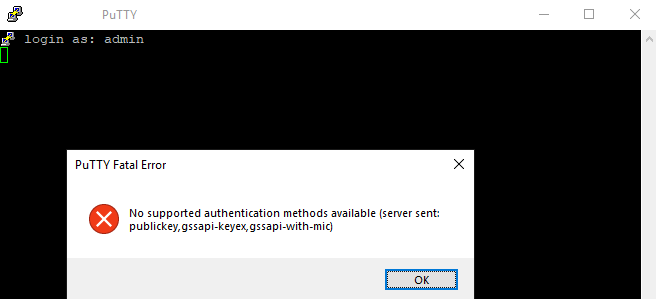
Cause
当使用除服务以外的任何用户登录时,这是预期行为。
Resolution
使用 服务用户身份登录。
任何其他用户名都将产生上述错误。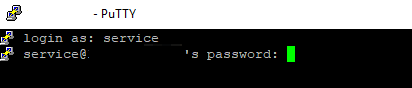
Additional Information
提醒:
尝试通过 ssh 登录时的另一个常见错误是:网络错误:连接超时:
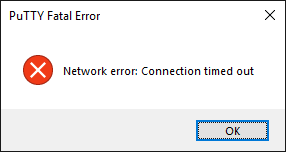
如果为 PowerStore 禁用了 ssh(默认为禁用状态),则可能会发生这种情况。
可以通过设置 >安全 >SSH 管理从 PowerStore Manager 启用 ssh
- 服务用户密码已在系统初始化期间定义。
- 如果您忘记了此密码,请尝试使用与管理员用户相同的密码。否则,请联系初始化系统的人员,或从 PowerStore Manager (GUI) 的“设置 >支持 >服务帐户”下重置服务密码
尝试通过 ssh 登录时的另一个常见错误是:网络错误:连接超时:
如果为 PowerStore 禁用了 ssh(默认为禁用状态),则可能会发生这种情况。
可以通过设置 >安全 >SSH 管理从 PowerStore Manager 启用 ssh
Affected Products
PowerStore, PowerStore 1000X, PowerStore 1000T, PowerStore Expansion Enclosure, PowerStore 3000X, PowerStore 3000T, PowerStore Rack, PowerStore 5000X, PowerStore 5000T, PowerStore 7000X, PowerStore 7000T, PowerStore 9000X, PowerStore 9000TArticle Properties
Article Number: 000132163
Article Type: Solution
Last Modified: 13 May 2025
Version: 6
Find answers to your questions from other Dell users
Support Services
Check if your device is covered by Support Services.