Visuell veiledning for Dell Latitude E6530 til datamaskinen
Summary: Denne artikkelen inneholder en visuell veiledning for Dell Latitude E6530.
This article applies to
This article does not apply to
This article is not tied to any specific product.
Not all product versions are identified in this article.
Instructions
Innholdsfortegnelse:
Merk: Du finner en mer detaljert beskrivelse av hvert sted i håndbøkene i Dell-støttehåndbøker.
1. Sett forfra

| 1 | Stereomikrofoner |
|---|---|
| 2 | Statuslys for kamera |
| 3 | Kamera |
| 4 | Skjerm |
| 5 | På/av-knapp |
| 6 | tastatur |
| 7 | Fingeravtrykksleser |
| 8 | SD-kortleser |
| 9 | Styreplate |
| 10 | Kabel for kontaktløs smartkortleser |
| 11 | Volumkontroller |
| 12 | LED-lamper for enhetsstatus |
2. Sett bakfra
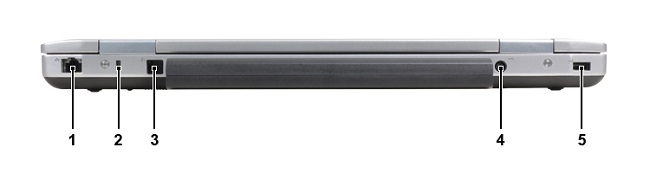
| 1 | Nettverksport (RJ45) |
|---|---|
| 2 | Spor for Kensington-lås |
| 3 | Modemport (RJ11) |
| 4 | Strømadapterkontakt |
| 5 | USB 2.0-port |
3. Sett fra undersiden
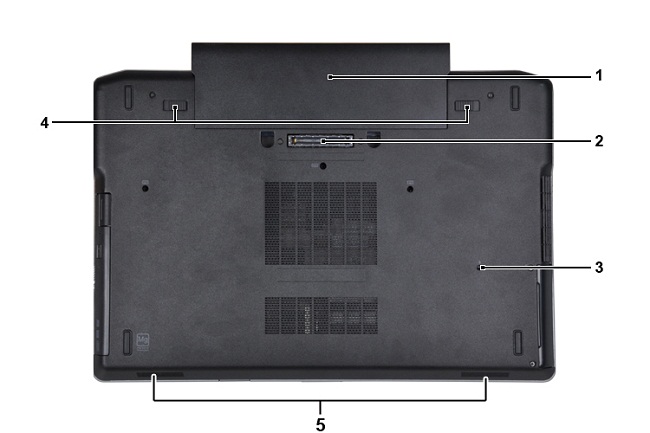
| 1 | Batteri |
|---|---|
| 2 | Dokkingkobling |
| 3 | Dreneringsspor for vann |
| 4 | Deksellåser for batteri |
| 5 | Høyttalere |
4. Sett fra venstre side

| 1 | Kontakt for ekstern VGA-skjerm |
|---|---|
| 2 | USB 3.0-port |
| 3 | Kombiplugg for hodetelefoner og mikrofon |
| 4 | Smartkortspor |
| 5 | Harddisk |
5. Sett fra høyre side
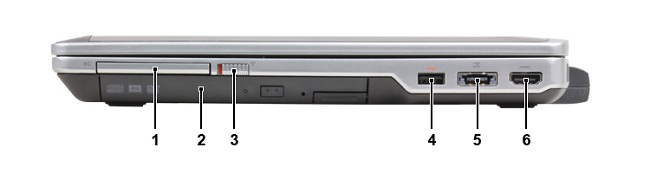
| 1 | ExpressCard-spor |
|---|---|
| 2 | Optisk stasjon |
| 3 | Trådløsbryter |
| 4 | PowerShare USB 3.0-kontakt |
| 5 | eSATA- og USB 2.0-kontakt |
| 6 | HDMI-port |
6. Sett ovenfra
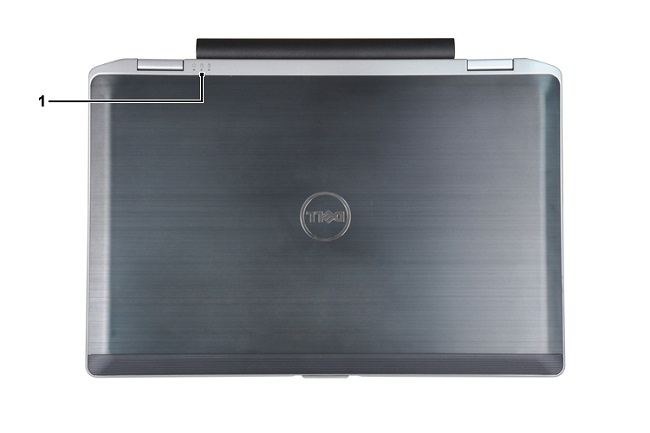
| 1 | LED-lamper for strøm-, harddisk- og batteristatus |
|---|
Affected Products
Latitude E6530Article Properties
Article Number: 000132933
Article Type: How To
Last Modified: 16 Jun 2025
Version: 4
Find answers to your questions from other Dell users
Support Services
Check if your device is covered by Support Services.