Swipe to Shutdown Screen Appears When Holding Down the Power Button on Dell Laptops
Summary: Learn about the Slide to Shutdown and Slide to Power Off features on Dell laptops. Understand how the power button swipe to shutdown works and find out if you can disable the swipe to shutdown screen. ...
This article applies to
This article does not apply to
This article is not tied to any specific product.
Not all product versions are identified in this article.
Symptoms
Affected Platforms:
- Latitude 5300
- Latitude 5300 2-in-1
- Latitude 5320
- Latitude 5400
- Latitude 5500
- Latitude 5520
- Latitude 7200 2-in-1
- Latitude 7300
- Latitude 7400
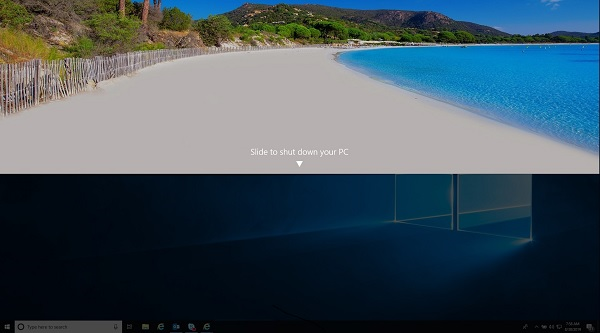
A Swipe to Shutdown option appears on Dell laptops that support modern standby
Dell has implemented a change to the behavior of the power button on a new Dell laptop to meet Microsoft requirements for modern standby.
If you hold down the power button on a Dell laptop that supports modern standby for five seconds, then the swipe to shutdown screen should appear:
Cause
Note: This new specification is that new laptops that support modern standby now show the Swipe to Shutdown screen regardless of if the computer ships with a touch or non-touch screen. This allows for the last chance to perform a normal shutdown by the operating system.
Resolution
On older Dell laptops and those that do not support modern standby, holding down the power button for five seconds forces the computer to shut down.
This is known as a Dirty or Forced Shutdown:
- The term does not necessarily mean causing a loss of data, but it can make accessing some data impossible without the help of a data recovery specialist. Many of the storage and boot drives that are sent in for recovery are often in a failed state because of a power glitch or being forced to turn off while in use.
Note: The power button behavior is working as designed and there is no way to change or configure this behavior on these computers.
However, for those needing the option to force one of these new Dell laptops with modern standby to turn off, holding down the power button for ten seconds overrides the power button behavior and perform a forced or dirty shutdown.
Note: As always Dell can take no responsibility for any loss of data on your computer. Dell Technologies recommends you regularly keep your computer backed up and your information in a safe location.
Swipe to Shutdown Screen Appears
Duration: 00:01:17 (hh:mm:ss)
When available, closed caption (subtitles) language settings can be chosen using the CC icon on this video player.
Affected Products
Latitude 7200 2-in-1, Latitude 5300 2-in-1, Latitude 5300, Latitude 5320, Latitude 7300, Latitude 5400, Latitude 7400, Latitude 5500, Latitude 5520Article Properties
Article Number: 000133975
Article Type: Solution
Last Modified: 21 Aug 2026
Version: 10
Find answers to your questions from other Dell users
Support Services
Check if your device is covered by Support Services.