按住 Dell 筆記型電腦的電源按鈕時,會出現滑動以關機畫面
Summary: 瞭解 Dell 筆記型電腦的滑動關機和滑動以關閉電源功能。了解電源按鈕滑動以關機的運作方式,並瞭解是否可以停用滑動以關機螢幕。
This article applies to
This article does not apply to
This article is not tied to any specific product.
Not all product versions are identified in this article.
Symptoms
受影響的平台:
- Latitude 5300
- Latitude 5300 二合一
- Latitude 5320
- Latitude 5400
- Latitude 5500
- Latitude 5520
- Latitude 7200 二合一
- Latitude 7300
- Latitude 7400
支援新式待命的 Dell 筆記型電腦上會出現滑動以關機選項
Dell 已變更全新 Dell 筆記型電腦上的電源按鈕行為,以滿足Microsoft新式待命模式的要求。
如果您在支援新式待命的 Dell 筆記型電腦上按住電源按鈕五秒,則應會出現滑動以關機畫面:
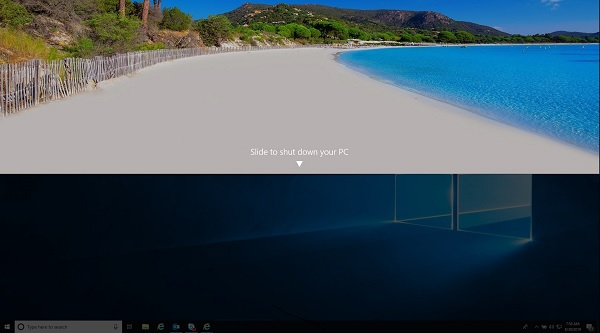
注意:此新規格代表支援新式待命的新筆記型電腦,無論電腦隨附觸控或非觸控螢幕,現在皆會顯示滑動以關機畫面。這可讓您有最後一次機會執行作業系統的正常關機。
Cause
不適用
Resolution
在較舊的 Dell 筆記型電腦和支援新式待命的電腦上,按住電源按鈕五秒會強制電腦關機。
這稱為「髒」或「強制關機」:
- 該術語並不一定意味著導致數據丟失,但是如果沒有數據恢復專家的説明,它可能會使訪問某些數據變得不可能。許多送去進行復原的儲存裝置和開機磁碟機經常因為電源故障或在使用中被迫關閉而處於故障狀態。
注意:電源按鈕行為是依設計運作,無法在這些電腦上變更或設定此行為。
然而,若需要選擇強制關閉其中一台具有新式待命功能的全新 Dell 筆記型電腦,按住電源按鈕十秒會覆寫電源按鈕的行為,並執行強制或不正常關機。
注意:如果電腦上有任何資料遺失,Dell 一律概不負責。Dell Technologies 建議您定期將電腦與資訊備份在安全的位置。
Affected Products
Latitude 7200 2-in-1, Latitude 5300 2-in-1, Latitude 5300, Latitude 5320, Latitude 7300, Latitude 5400, Latitude 7400, Latitude 5500, Latitude 5520Article Properties
Article Number: 000133975
Article Type: Solution
Last Modified: 28 May 2025
Version: 8
Find answers to your questions from other Dell users
Support Services
Check if your device is covered by Support Services.