Dell Networking X Series - VLAN 포트 구성을 지우는 방법
Summary: Dell Networking X Series 스위치에서 VLAN 포트 구성을 지우는 방법
This article applies to
This article does not apply to
This article is not tied to any specific product.
Not all product versions are identified in this article.
Symptoms
이 문서에서는 Dell Networking X Series 스위치에서 VLAN 포트 구성을 지우는 방법에 대해 설명합니다.
1 단계 : Dashboard(대시보드)를 클릭하고 오른쪽에서 configure VLAN(VLAN 구성)을 선택합니다.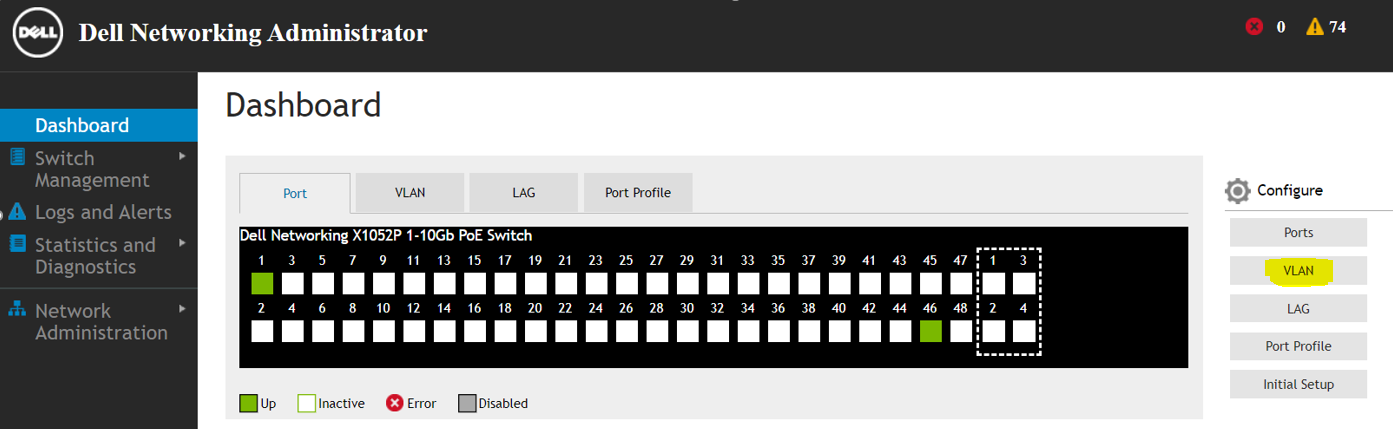
2단계: 포트 구성 및 VLAN에 할당을 선택하고 "Next"를 클릭합니다.

3단계: VLAN 포트 할당 지우기를 Port edit mode로 선택하고 "Next"를 클릭합니다.

4단계: 변경 사항을 확인하고 "Apply"를 클릭합니다.
 선택한 포트가 지워지고 기본 VLAN 모드로 설정됩니다.

5단계: "Yes"를 클릭하여 VLAN 포트 할당을 지웁니다.
Cause
.
Resolution
.
Affected Products
Dell Networking X1000 SeriesArticle Properties
Article Number: 000133976
Article Type: Solution
Last Modified: 04 Apr 2025
Version: 4
Find answers to your questions from other Dell users
Support Services
Check if your device is covered by Support Services.