Dell Networking X Series - How to clear VLAN port configuration
Summary: How to clear VLAN port configuration on Dell Networking X series switches.
This article applies to
This article does not apply to
This article is not tied to any specific product.
Not all product versions are identified in this article.
Symptoms
This article explains how to clear VLAN port configuration on Dell Networking X series switches.
Step 1: Click Dashboard and select configure VLAN on the right side.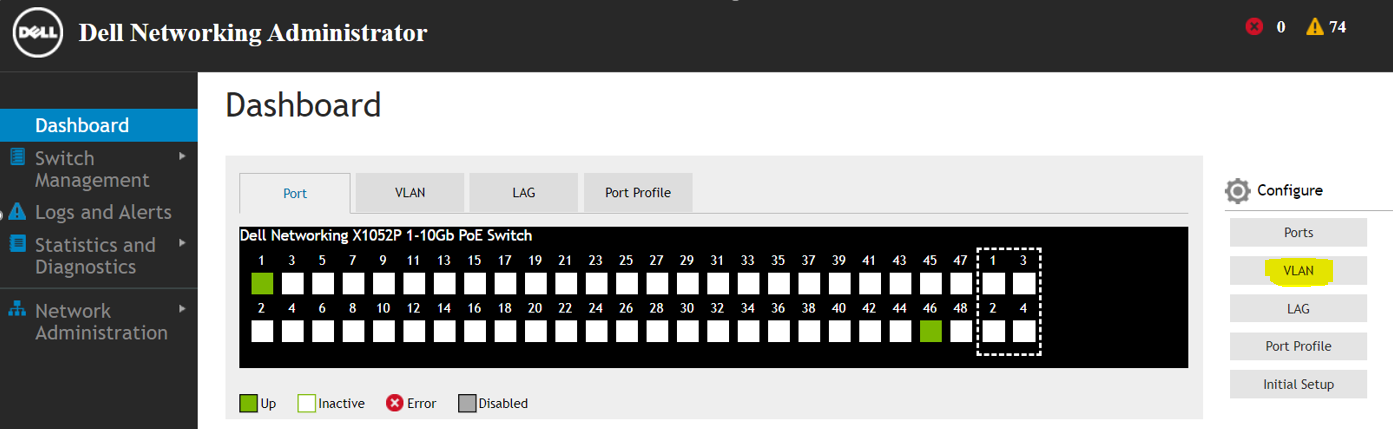
Step 2: Select Configure and assign ports to VLAN and click "Next".

Step 3: Select clear VLAN port assignment as Port edit mode and click "Next".

Step 4: Verify the changes and click "Apply".
 Selected ports get cleared and set to default VLAN mode.

Step 5: Click "Yes" to clear VLAN port assignment.
Cause
.
Resolution
.
Affected Products
Dell Networking X1000 SeriesArticle Properties
Article Number: 000133976
Article Type: Solution
Last Modified: 04 Apr 2025
Version: 4
Find answers to your questions from other Dell users
Support Services
Check if your device is covered by Support Services.