DBCC CHECKDB- fejlfinding af beskadigelse af SQL Server-database
Summary: DBCC CHECKDB, DBCC, databasereparation, database, beskadiget database
This article applies to
This article does not apply to
This article is not tied to any specific product.
Not all product versions are identified in this article.
Symptoms
Problem: MS SQL Server-databasen er beskadiget og skal repareres for at opretholde stabilitet og konsistens.
Cause
Softwarefejl i MS SQL Server-database, logfiler og programfiler.
Resolution
DBCC er et indbygget værktøj i Microsoft SQL Server, der er designet til at kontrollere og reparere Microsoft SQL Server-databaser. Denne artikel beskriver kommandoen og indstillingerne for DBCC CHECKDB i kontrol af databasens logiske og fysiske integritet.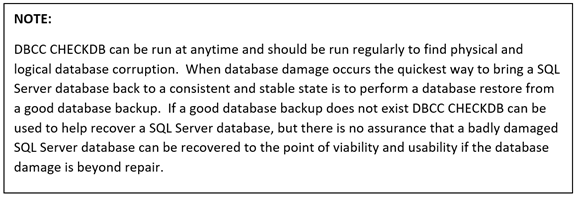
DBCC CHECKDB (Transact-SQL):

Trin til at køre DBCC CHECKDB:
- Open SQL Server Studio Management
- Åbn et forespørgselsvindue
- Indtast "DBCC CHECKDB (Databasenavn)"

4. Kontroller nederst i forespørgselsresultaterne for at se allokerings- og konsistensfejl.
5. Hvis der vises allokerings- og konsistensfejl i resultaterne, skal databasen enten gendannes fra en sikkerhedskopi eller udføres en databasereparation vha. DBCC CHECKDB.
DBCC-reparationsindstillinger
- REPAIR_REBUILD: Kommandoen nedenfor sætter databasen i en tilstand, der tillader reparation.
USE Master;
GO
ALTER DATABASE TSQL2012
SET SINGLE_USER
WITH ROLLBACK IMMEDIATE;
GO
DBCC CHECKDB (TSQL2012, REPAIR_REBUILD)
GO
ALTER DATABASE TSQL2012
SET MULTI_USER;
GO
Kopier kommandoen nedenfor, og indsæt den i forespørgselssessionen med det korrekte databasenavn:
--Command below performs a Database repair not allowing Data loss

USE Master;
GO
ALTER DATABASE TSQL2012
SET SINGLE_USER
WITH ROLLBACK IMMEDIATE;
GO
DBCC CHECKDB (TSQL2012,REPAIR_REBUILD)
GO
ALTER DATABASE TSQL2012
SET MULTI_USER;
GO
2. REPAIR_ALLOW_DATA_LOSS: Nedenstående kommando udfører databasereparation og kan resultere i tab af data for at fuldføre reparationsprocessen.
--Command below performs a database repair that may result in data loss,
 --replace TSQL2012 with the database name of database being repaired
USE Master
GO
ALTER DATABASE TSQL2012
SET SINGLE_USER
WITH ROLLBACK IMMEDIATE
GO
DBCC CHECKDB (TSQL2012, REPAIR_ALLOW_DATA_LOSS)
GO
ALTERDATABASE TSQL2012
SET MULTI_USER
GO
Kopier kommandoen nedenfor, og indsæt den i forespørgselssessionen med det korrekte databasenavn:
Nedenstående kommandoer er nyttige, hvis databasens fysiske diskplads er ved at løbe tør for plads.
--Command below estimates the size TEMPDB must be to complete the DBCC CHECKDB job
USE Master;
GO
ALTER DATABASE TSQL2012
SET SINGLE_USER
WITH ROLLBACK IMMEDIATE;
GO
DBCC CHECKDB (TSQL2012, REPAIR_REBUILD)
WITH ESTIMATEONLY;
GO
ALTER DATABASE TSQL2012
SET MULTI_USER
GO
Kopier kommandoen nedenfor, og indsæt den i forespørgselssessionen med det korrekte databasenavn:
--Command below estimates the size TEMPDB must be to complete the DBCC CHECKDB job

USE Master;
GO
ALTER DATABASE TSQL2012
SET SINGLE_USER
WITH ROLLBACK IMMEDIATE;
GO
DBCC CHECKDB (TSQL2012, REPAIR_REBUILD)
WITH ESTIMATEONLY;
GO
ALTER DATABASE TSQL2012
SET MULTI_USER
GO
--Command below will run DBCC CHECKDB without using TEMDB and creating a DB
--snapshot. When not using TEMPDB with a DB snapshot all data will be checked in
-- the live database not not a database snapshot.

USE Master;
GO
ALTER DATABASE TSQL2012
SET SINGLE_USER
WITH ROLLBACK IMMEDIATE;
GO
DBCC CHECKDB (TSQL2012, REPAIR_REBUILD)
WITH TABLOCK;
GO
ALTER DATABASE TSQL2012
SET MULTI_USER
GO
Kopier kommandoen nedenfor, indsæt til forespørgselssessionen, og indsæt det korrekte databasenavn:
--Command below will run DBCC CHECKDB without using TEMPDB and creating a DB
--snapshot. When not using TEMPDB with a DB snapshot all data will be checked in ---the live database not a database snapshot.

USE Master;
GO
ALTER DATABASE TSQL2012
SET SINGLE_USER
WITH ROLLBACK IMMEDIATE;
GO
DBCC CHECKDB (TSQL2012, REPAIR_REBUILD)
WITH TABLOCK;
GO
ALTER DATABASE TSQL2012
SET MULTI_USER
GO
Affected Products
Dell Quickstart Data Warehouse Appliance, Prosupport for Microsoft SoftwareArticle Properties
Article Number: 000134529
Article Type: Solution
Last Modified: 18 Mar 2025
Version: 5
Find answers to your questions from other Dell users
Support Services
Check if your device is covered by Support Services.