Sådan får du adgang til ONIE-prompten i Dell EMC Networking N3000E-ON-seriens switche
Summary: Sådan får du adgang til ONIE-prompten i Dell EMC Networking N3000E-ON-seriens switche
This article applies to
This article does not apply to
This article is not tied to any specific product.
Not all product versions are identified in this article.
Symptoms
Denne artikel beskriver, hvordan du får adgang til ONIE-prompten i Dell Networking N3000E-ON-seriens switche
Indeks
Hvorfor vi har brug for adgang til ONIE
N3000E-switche understøtter også Open Network Install Environment (ONIE), hvilket muliggør installation af alternative netværksoperativsystemer. Dell N3000E-ON-switche er som standard forudinstalleret med Dell OS6. Derfor er vi nødt til manuelt at starte ONIE i switchen.
Understøttede platforme
Dette dokument gælder for følgende modeller
- N3024EF-ON
- N3024ET-ON
- N3024EP-ON
- N3048EP-ON
- N3048ET-ON
Procedure
1. Tilslut et serielt kabel til switchens serielle konsolport (115.200 BAUD, 8 databit, ingen paritet, 1 stopbit,)
2. Genstart switchen
3. Når startmenuen vises for at vælge "Vis startmenu", skal du skrive 2
 Du har kun 3 sekunder til at foretage valget. Hvis vi går glip af dette, bliver vi nødt til at genstarte kontakten igen for at få prompten
4. Vælg "BOOT ONIE (Rescue Mode") i menuen Boot for at vælge "BOOT ONIE (Rescue Mode), skriv 13
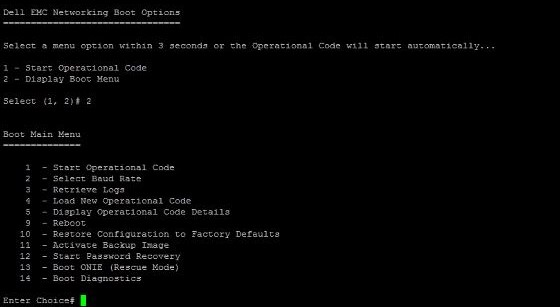
Dette fører os til ONIE-prompten
ONIE:/ #
Affected Products
Dell EMC PowerSwitch N3000E-ON SeriesArticle Properties
Article Number: 000134769
Article Type: Solution
Last Modified: 23 Sep 2024
Version: 4
Find answers to your questions from other Dell users
Support Services
Check if your device is covered by Support Services.