如何在 Dell EMC Networking N3000E-ON 系列交换机中访问 ONIE 提示符
Summary: 如何在 Dell EMC Networking N3000E-ON 系列交换机中访问 ONIE 提示符
This article applies to
This article does not apply to
This article is not tied to any specific product.
Not all product versions are identified in this article.
Symptoms
本文介绍如何在 Dell Networking N3000E-ON 系列交换机中访问 ONIE 提示符
索引
为什么我们需要访问 ONIE
N3000E 交换机还支持开放网络安装环境 (ONIE),可安装备用网络操作系统。默认情况下,Dell N3000E-ON 交换机预装 Dell OS6。因此,我们需要在交换机中手动启动 ONIE。
支持的平台
本文档适用于以下型号
- N3024EF-ON
- N3024ET-ON
- N3024EP-ON
- N3048EP-ON
- N3048ET-ON
流程
1.将串行电缆连接到交换机的串行控制台端口(115,200 波特,8 个数据位,无奇偶校验,1 个停止位)
2.关闭再打开交换机
3.当启动菜单出现并选择“Display boot Menu”时,键入 2
 您只有 3 秒钟的时间进行选择。如果我们错过了这一点,我们将不得不再次重新启动交换机以获得提示
4.从 Boot Menu 中选择“BOOT ONIE (Rescue Mode)”,键入 13
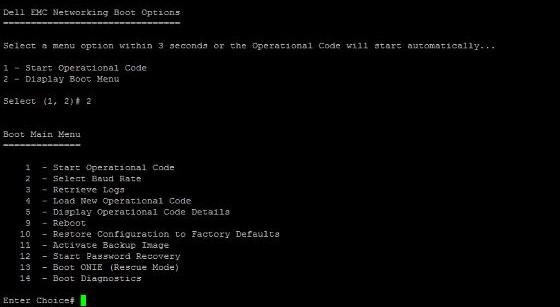
这会将我们转到 ONIE 提示符
ONIE:/#
Affected Products
Dell EMC PowerSwitch N3000E-ON SeriesArticle Properties
Article Number: 000134769
Article Type: Solution
Last Modified: 23 Sep 2024
Version: 4
Find answers to your questions from other Dell users
Support Services
Check if your device is covered by Support Services.