将 MDT 启动映像导入 Windows 部署服务
Summary: 导入 Microsoft 部署工具包 (MDT) 启动映像,以与 Windows 部署服务 (WDS) 配合使用。
This article applies to
This article does not apply to
This article is not tied to any specific product.
Not all product versions are identified in this article.
Symptoms
Cause
Resolution
摘要:按照以下步骤将 Microsoft 部署工具包 (MDT) 启动映像导入 Windows 部署服务 (WDS)。
注:注:为使用本文,建议具备 Microsoft 部署工具包和 Windows 部署服务的应用知识。
Windows 部署服务 (WDS) 更新。
在 MDT 中更新启动映像(例如有更新的驱动程序)后,它不会自动更新 WDS。
如何导入启动映像
- 在 MDT 中提供正确的驱动程序:
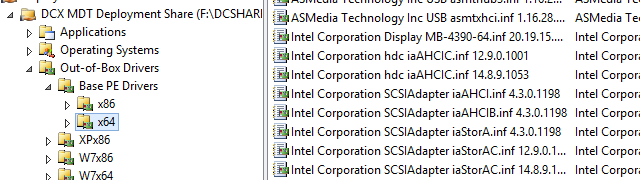
- 更新部署共享

- 转至 Windows 部署服务,启动映像
- 如果 WDS 中没有 Lite Touch Windows PE x64,请转至“添加启动映像”(LiteTouchPE_x64.wim):
- 如果 WDS 启动映像中已经有 Lite Touch Windows PE (x64),请右键单击映像并选择“替换映像”(然后选择 LiteTouchPE_x64.wim 的位置)。


- 如果 WDS 启动映像中已经有 Lite Touch Windows PE (x64),请右键单击映像并选择“替换映像”(然后选择 LiteTouchPE_x64.wim 的位置)。
Article Properties
Article Number: 000134992
Article Type: Solution
Last Modified: 06 May 2021
Version: 3
Find answers to your questions from other Dell users
Support Services
Check if your device is covered by Support Services.