如果在组策略设置中启用了“关闭传感器”,则 Windows 10 上的自动旋转无法正常工作
Summary: 配置组策略以关闭传感器,以确保自动旋转功能在 Windows 10 中正常工作。
This article applies to
This article does not apply to
This article is not tied to any specific product.
Not all product versions are identified in this article.
Symptoms
在 Windows 10 中启用组策略以关闭传感器可能会导致自动旋转功能无法正常工作。按照本文中的步骤作,确保将此组策略配置为允许自动轮换功能。
自动旋转功能在 Windows 10 中不起作用
如果在 Windows 10 中控制 位置和传感器/关闭传感器 的组策略设置为 Enabled(图 1),则 Windows 10 中的自动旋转功能无法正常工作。此问题已在戴尔 Latitude 5285 上报告,但可能会影响其他使用自动旋转功能的 Windows 10 平板电脑或笔记本电脑。
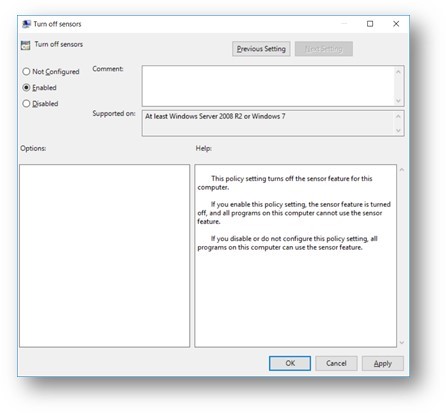
图 1:Windows 10 关闭传感器组策略已启用
Cause
不适用
Resolution
要确保在 Windows 10 中为自动旋转功能正确配置此组策略,请执行以下步骤:
- 在搜索框中键入 gpedit.msc ,然后在搜索结果中单击 gpedit.msc 以打开 本地组策略编辑器。
- 转到以下文件夹位置:本地计算机策略 > 管理模板 > Windows 组件 > 位置和传感器
- 从显示的设置列表中双击 关闭传感器 。
- 选择默认的未配置设置,然后单击应用以保存更改。
- 重新启动计算机并在 Windows 10 中测试自动旋转功能。
Affected Products
Latitude 5285 2-in-1Article Properties
Article Number: 000135529
Article Type: Solution
Last Modified: 01 Oct 2025
Version: 5
Find answers to your questions from other Dell users
Support Services
Check if your device is covered by Support Services.