如何安裝 Latitude Rugged 平板電腦的模組化配件
Summary: 下列文章提供 Dell Latitude 12 Rugged 7202 和 Rugged Extreme 7212 平板電腦模組化配件的安裝和功能相關資訊。
This article applies to
This article does not apply to
This article is not tied to any specific product.
Not all product versions are identified in this article.
Instructions
適用於 Latitude Rugged 平板電腦的模組化配件
Dell Latitude 12 Rugged 7202 和 Rugged Extreme 7212 平板電腦可將配件模組連接至其,以擴充其功能。
每個模組在安裝時都會牢固地連接在平板電腦的背面,不需要時可以將其卸下以減輕重量。

上圖所示的延伸 I/O 模組包含:
- USB 3.0 連接器 x 2
- 網路介面控制器 (NIC) 乙太網路連接埠
模組化配件 Rugged 平板電腦的安裝指南
-
將 模組 安裝在平板電腦背面。它位於電池上方和設備背面的Pogo引腳連接器頂部。
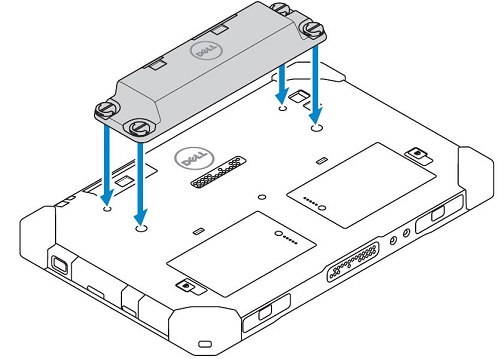
-
模組的每個角落各有一顆螺絲,平板電腦背面則有對應的孔。找到 四 (4) 個螺絲孔, 然後鎖緊直到固定。(螺絲為指旋螺絲。這意味著不需要工具來安裝或拆卸模組。指旋螺絲的頭部有一個 D 形環,可以向上翻轉,在擰緊或鬆開螺絲時能提供更強的抓握力。)
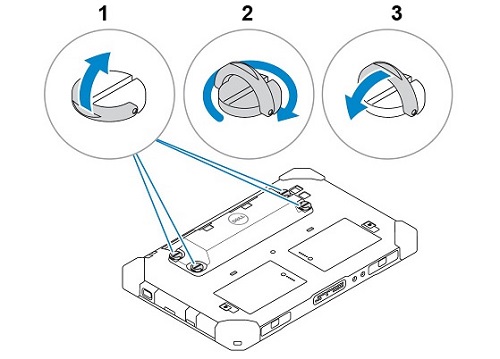
-
卸下模組是指鬆開四 (4) 顆指旋螺絲,直到模組從平板電腦背面鬆開。
Affected Products
Electronics & Accessories, Latitude 7212 Rugged Extreme Tablet, Latitude 7202 Rugged TabletArticle Properties
Article Number: 000137097
Article Type: How To
Last Modified: 30 Sep 2025
Version: 6
Find answers to your questions from other Dell users
Support Services
Check if your device is covered by Support Services.