如何为 Latitude Rugged 平板电脑安装模块化配件
Summary: 以下文章提供有关 Dell Latitude 12 Rugged 7202 和 Rugged Extreme 7212 平板电脑模块化配件的安装和功能的信息。
This article applies to
This article does not apply to
This article is not tied to any specific product.
Not all product versions are identified in this article.
Instructions
适用于 Latitude Rugged 平板电脑的模块化配件
Dell Latitude 12 Rugged 7202 和 Rugged Extreme 7212 平板电脑可以通过连接附件模块来扩展其功能。
每个模块在安装时都牢固地附着在平板电脑的背面,并且在不需要时可以拆卸以减轻重量。
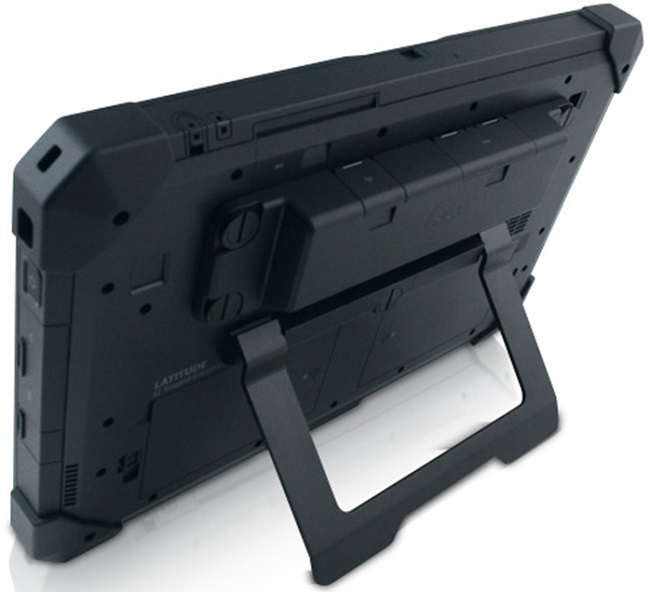
上图中的扩展 I/O 模块包括:
- USB 3.0 连接器 x 2
- 网络接口控制器 (NIC) 以太网端口
加固型平板电脑的模块化配件安装指南
-
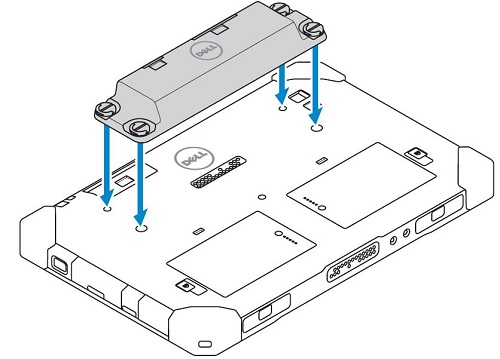
将 模块 放在平板电脑背面。它位于电池上方和设备背面弹簧针连接器的顶部。
-
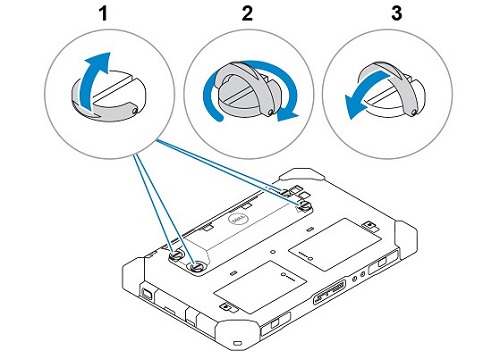
模块的每个角都有一个螺钉,平板电脑背面有一个相应的孔。找到 四 (4) 个孔的螺钉并 拧紧直至固定。(螺钉是指旋螺钉。这意味着安装或拆卸模块不需要工具。指旋螺钉的头部有一个 D 形环,可以向上翻转,为拧紧或松开螺钉提供更好的抓地力。)
-
卸下模块会拧松四 (4) 颗指旋螺钉,直至模块从平板电脑背面释放。
Affected Products
Electronics & Accessories, Latitude 7212 Rugged Extreme Tablet, Latitude 7202 Rugged TabletArticle Properties
Article Number: 000137097
Article Type: How To
Last Modified: 30 Sep 2025
Version: 6
Find answers to your questions from other Dell users
Support Services
Check if your device is covered by Support Services.