Inspiron and Vostro All-In-One Articulating Stand Assembly Issue
Summary: This article provides information about the articulated stand for your Inspiron or Vostro 24 All-in-One system not being attached.
This article applies to
This article does not apply to
This article is not tied to any specific product.
Not all product versions are identified in this article.
Symptoms
Stand not attached
When you receive a newly purchased All-In-One (AIO) system, the articulating stand that is shipped together with the system is it not attached before the shipment.
This is the original design for the All-in-One (AIO) system models listed below:
- Inspiron 24 3452 All-in-One
- Inspiron 24 3455 All-in-One
- Inspiron 24 3459 All-in-One
- Inspiron 24 3464 All-in-One
- Inspiron 24 5459 All-in-One
- Inspiron 24 5488 All-in-One
- Vostro 24 5450 All-in-One
- Vostro 24 5460 All-in-One
Cause
No cause information
Resolution
Articulating Stand installation
There are mounting screws for the articulated stand hidden under the hinge cover on the back of the system. In order to mount your system on the articulating stand, complete the following steps:
- Remove the hinge cover on the back of your system. Once removed, locate the four mounting screws. (See figures 1 & 2.)
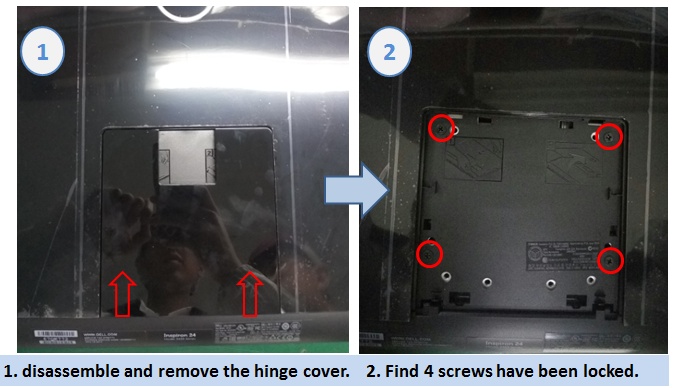
Figures 1 & 2 - Removal of hinge cover and accessing mounting screws
- Remove the four Philips head mounting screws and install the articulated stand. (See Figures 3 & 4.)
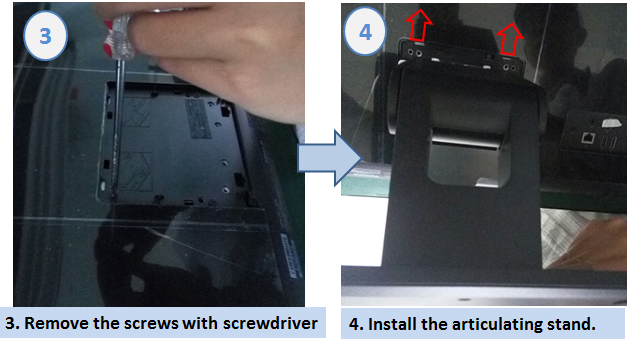
Figured 3 & 4. - Removing the mounting screws and installation of the articulated stand
- Install the four Philips head screws to secure the articulated stand then reinstall the hinge cover. (Figures 5 and 6)
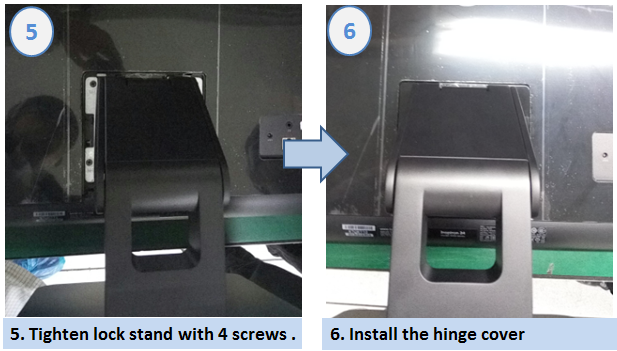
Figures 5 and 6 - Reinstallation of the screws and the hinge cover
Affected Products
Inspiron 3452 AIO, Inspiron 3455, Inspiron 3459, Inspiron 24 3464, Inspiron 24 5459 AIO, Inspiron 24 5488, Vostro 5450, Vostro 5460Article Properties
Article Number: 000137283
Article Type: Solution
Last Modified: 22 Apr 2025
Version: 5
Find answers to your questions from other Dell users
Support Services
Check if your device is covered by Support Services.