"Balanced" or "Dell" Power Profiles are Causing Throttling of the Central Processing Unit (CPU)
Summary: This article explains how to set the power profiles to decrease the throttling of the CPU.
This article applies to
This article does not apply to
This article is not tied to any specific product.
Not all product versions are identified in this article.
Symptoms
Power Profiles are Causing Throttling of the CPU
Despite the balanced power profile stating minimum 5% and maximum 100% CPU, the power profile is limiting performance of rendering and other CPU intensive applications.
Cause
No cause information is available.
Resolution
Change the Power Profile when Handling Large Amounts of Data
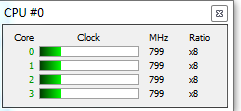
When a large amount of data is queued to be processed, the processor clock speed rises and stay at that level until the process is complete. In "Balanced" or "Dell," the CPU returns to default (usually 800 MHz) quickly.
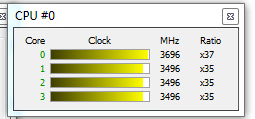
If the system is placed into High Performance, the CPU is allowed to stay at the clock rate necessary to process the queue of data for it. This is more pronounced when using Google Chrome as it is multi-threaded and uses hardware acceleration.
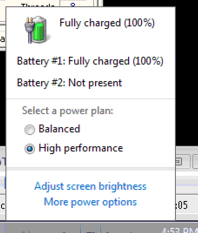
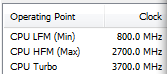
Balanced:
High Performance:
Note: This may cause the battery life to suffer on laptops.
If the system is not doing anything CPU intensive such as CAD, Video, or Audio rendering, the system can be placed back into the Balanced power profile until higher performance is needed again.
Windows 10 has also introduced Power Throttling 
Affected Products
Alienware, Inspiron, OptiPlex, Vostro, XPS, G Series, G Series, Alienware, Inspiron, Latitude, Vostro, XPS, Fixed Workstations, Mobile WorkstationsArticle Properties
Article Number: 000139695
Article Type: Solution
Last Modified: 16 Jul 2025
Version: 6
Find answers to your questions from other Dell users
Support Services
Check if your device is covered by Support Services.