Latitude 5590: Veiledning for tastaturfunksjon
Summary: Følgende veiledning oppgir de tilgjengelige tastatursnarveiene og funksjonene de utfører på Dell Latitude 5590.
This article applies to
This article does not apply to
This article is not tied to any specific product.
Not all product versions are identified in this article.
Symptoms
Tastatursnarvei, tastefunksjoner
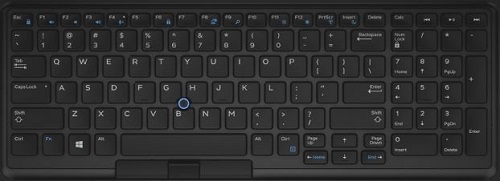
Følgende tabell er en liste over tilgjengelige tastatursnarveier på Latitude 5590.
Cause
Ikke aktuelt
Resolution
| Funksjonstast-kombinasjon | Resultat |
|---|---|
| Fn+F1 | Dempe høyttaler |
| Fn+F2 | Volum ned |
| Fn+F3 | Volum opp |
| Fn+F4 | Demp mikrofon |
| Fn+F5 | Number Lock |
| Fn+F6 | Scroll Lock |
| Fn+F8 | Veksle mellom skjerm (Win+P) |
| Fn+F9 | Søk |
| Fn og F10 (ekstrautstyr) | Øk lysstyrken på tastaturbakgrunnsbelysningen (ekstrautstyr) |
| Fn+F11 | Redusere LCD-lysstyrken |
| Fn+F12 | Øke LCD-lysstyrken |
| Fn+Esc | Låse Fn-tast for svitsj |
| Fn+Insert | Hvilemodus |
| Fn+Print Screen | Slå trådløst av og på |
| Fn+høyre markør | End |
| Fn+pil venstre | Hjem |
 Gå til kunnskapsbasen for tastaturet for å få mer ressurser og informasjon.
 Hvis du vil ha mer informasjon, kan du gå til støttesiden for pekeflaten.
 Du finner også flere artikler og mer informasjon på støttesiden for musen.
Affected Products
Latitude 5590Article Properties
Article Number: 000143256
Article Type: Solution
Last Modified: 01 May 2026
Version: 6
Find answers to your questions from other Dell users
Support Services
Check if your device is covered by Support Services.