Latitude 5580: No Hard Drive Activity or Battery LED
Summary: This article describes the function of the front status LED on the Latitude 5580.
This article applies to
This article does not apply to
This article is not tied to any specific product.
Not all product versions are identified in this article.
Symptoms
Cause
No cause information is available.
Resolution
Single Status Front LED
The Latitude 5580 has no hard drive activity or battery status LED. The system uses the current standard single LED status light on the front right edge of the system and the power button LED.
The power button LED shows the system's power state of On or Off. While the front chassis LED indicates when the system is charging. Both LEDs do not flash when the system is put to sleep or hibernate. The system uses an amber and white flash pattern on the front chassis LED to indicate that an error has occurred.
Front Chassis LED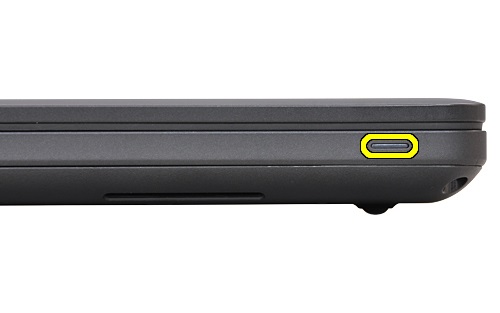
Power Button LED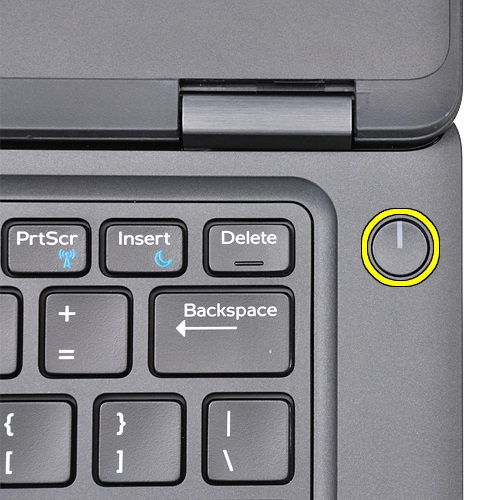
For more System information, see the: Dell Latitude 5580 System Guide
Affected Products
Latitude 5580Article Properties
Article Number: 000143646
Article Type: Solution
Last Modified: 21 Aug 2025
Version: 5
Find answers to your questions from other Dell users
Support Services
Check if your device is covered by Support Services.