Dell Latitude 3480 and 3580 - LED Functionality
Summary: This article describes the functionality and diagnostic capabilities of the LED lights on the Latitude 3480 and 3580 laptops.
This article applies to
This article does not apply to
This article is not tied to any specific product.
Not all product versions are identified in this article.
Symptoms
LED Codes
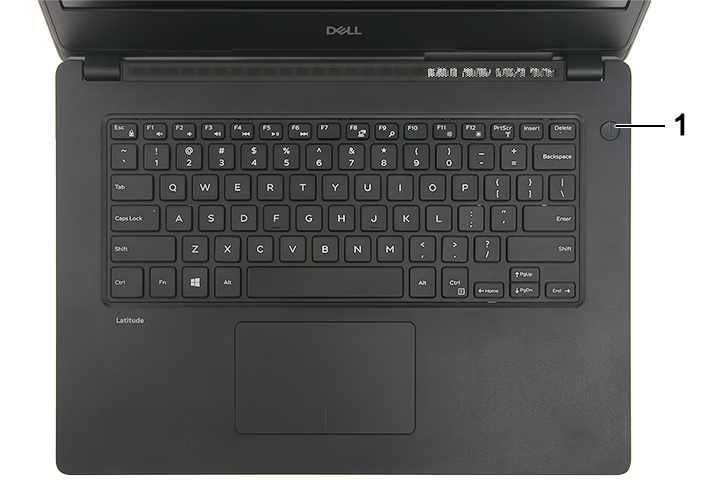
Number 1 - Power Button LED - Power status indicator
| LED Behavior | Power State |
| Solid White | On |
| Breathe White (slow pulse) | Standby |
| Off | Hibernate |
| Off | Soft Off |
| Off | No AC Power or Battery |
Cause
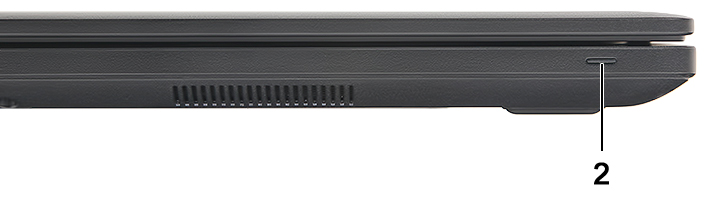
Number 2 - Front Battery LED - Battery power management indicator
| LED Behavior | Description |
| Solid White | An unauthenticated or unsupported non-Dell AC adapter or battery is attached to your laptop |
| Constantly blinking amber light | Battery below specified Low Battery level |
| Light off | Battery in full charge mode with AC adapter present |
| White light on | Battery in charge mode with AC adapter present |
Resolution
This platform relies on the Battery LED light blinking in an amber or white pattern to determine a failure as listed in the following table:
Note: The blinking patterns consist of two numbers (representing the First Group: Amber blinks, Second Group: White blinks).
First Group: The LED blinks 1 to 9 times followed by a brief pause with the LED off at an interval of 1.5 seconds. This is in Amber color.
Second Group: The LED blinks 1 to 9 times that would then be followed by a longer pause before the next cycle starts again at an interval of 1.5 seconds. This is in White color.
Example: No Memory detected (2,3). The battery LED blinks two times in Amber followed by a pause, and then blinks 3 times in White. The Battery LED will pause for 3 seconds before the next cycle repeats itself again.
First Group: The LED blinks 1 to 9 times followed by a brief pause with the LED off at an interval of 1.5 seconds. This is in Amber color.
Second Group: The LED blinks 1 to 9 times that would then be followed by a longer pause before the next cycle starts again at an interval of 1.5 seconds. This is in White color.
Example: No Memory detected (2,3). The battery LED blinks two times in Amber followed by a pause, and then blinks 3 times in White. The Battery LED will pause for 3 seconds before the next cycle repeats itself again.
| Amber/White Blinking Pattern | Problem Description | Suggested Resolution |
| 2.1 | CPU | CPU failure |
| 2.2 | Motherboard: BIOS ROM | Motherboard, covers BIOS corruption or ROM error |
| 2.3 | Memory | No memory/RAM detected |
| 2.4 | Memory | Memory/RAM failure |
| 2.5 | Memory | Invalid memory installed |
| 2.6 | Motherboard: Chipset | Motherboard or Chipset error |
| 2.7 | LCD | Replace the system board |
| 3.1 | RTC Power Failure | CMOS battery failure |
| 3.2 | PCI/Video | PCI or video card/chip failure |
| 3.3 | BIOS Recovery 1 | Recovery image not found |
| 3.4 | BIOS Recovery 2 | Recovery image found but invalid |
Affected Products
Dell Latitude 3480/3488, Dell Latitude 3580/3588Article Properties
Article Number: 000144516
Article Type: Solution
Last Modified: 19 Feb 2026
Version: 7
Find answers to your questions from other Dell users
Support Services
Check if your device is covered by Support Services.