Latitude 7480:创建暂停/中断热键的步骤
Summary: 使用 Latitude 7480 创建暂停/中断热键的步骤。
This article applies to
This article does not apply to
This article is not tied to any specific product.
Not all product versions are identified in this article.
Symptoms
Cause
无可用的原因信息。
Resolution
注册表编辑
警告:以下步骤适用于高级用户。修改 Windows 注册表可能会导致数据丢失。在执行这些步骤之前,应备份 Windows 注册表或创建还原点。
如何在 Windows 中备份和还原注册表
如何在 Windows
中备份和还原注册表
- 单击 Windows 图标或键,然后键入“Regedit”。
- 打开Regedit。您可能会收到 Windows“用户帐户控制”提示,单击“是”。
- 展开以下注册表元素:HKEY_LOCAL_MACHINE > SYSTEM > Current Control Set > Control > Keyboard Layout
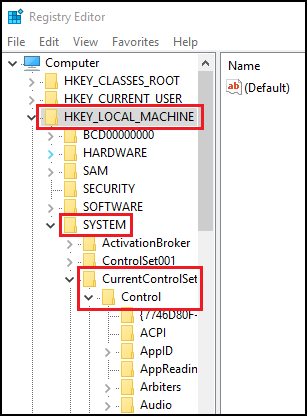

- 右键单击 并选择 “新建”,然后选择 “二进制值”。
- 键入名称 Scancode Map。
- 双击 Scancode Map ,然后键入:
00 00 00 00 00 00 00 00 02 00 00 00 46 E0 44 00 00 00 00 00 - 单击 OK。
- 关闭 注册表编辑器。
- 重新启动系统。
您现在应该能够使用 CTRL + F10 作为 Pause/Break 键。
Affected Products
Latitude 7480Article Properties
Article Number: 000144800
Article Type: Solution
Last Modified: 22 Aug 2025
Version: 5
Find answers to your questions from other Dell users
Support Services
Check if your device is covered by Support Services.