Latitude 7480: Steps For Creating a Pause/Break Hotkey
Summary: Steps for creating a pause/break hot key with the Latitude 7480.
This article applies to
This article does not apply to
This article is not tied to any specific product.
Not all product versions are identified in this article.
Symptoms
Newer Dell computers do not have a Pause/Break key on the keyboard. The following steps can be used to assign the Pause/Break functionality to a given shortcut.
Cause
No cause information is available.
Resolution
Registry Edit
Warning: The following steps are for advanced users. Modifying the Windows Registry can lead to data loss. The Windows registry should be backed up, or a Restore Point should be created prior to these steps.
How to Back Up and Restore the Registry in Windows
How to Back Up and Restore the Registry in Windows
- Click the Windows icon or key and type "Regedit."
- Open Regedit. You may receive a Windows "User Account Control" prompt, click Yes.
- Expand the following registry elements: HKEY_LOCAL_MACHINE > SYSTEM > Current Control Set > Control > Keyboard Layout
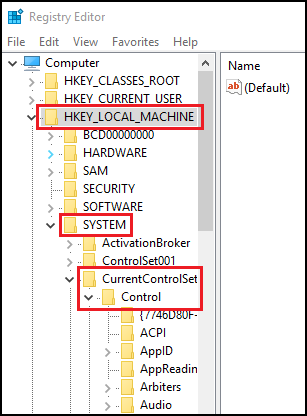
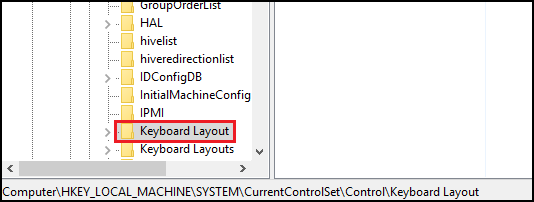
- Right-click and choose New, and then Binary Value.
- Type name Scancode Map.
- Double-click Scancode Map and type:
00 00 00 00 00 00 00 00 02 00 00 00 46 E0 44 00 00 00 00 00 - Click OK.
- Close Registry Editor.
- Restart your System.
You should now be able to use CTRL + F10 as the Pause/Break key.
Affected Products
Latitude 7480Article Properties
Article Number: 000144800
Article Type: Solution
Last Modified: 22 Aug 2025
Version: 5
Find answers to your questions from other Dell users
Support Services
Check if your device is covered by Support Services.