Microsoft Deployment Tools 2013 Update 2 包含 UEFI 部署順序中的問題
Summary: 有關解決 Microsoft 部署工具 2013 更新 2 中的問題的資訊。
This article applies to
This article does not apply to
This article is not tied to any specific product.
Not all product versions are identified in this article.
Symptoms
MDT 2013 將無法建立映像
使用 Microsoft Deployment Toolkit (MDT) 2013 Update 2 時,您可能會遇到這樣一種情況:儘管在 MDT 2013 中選取了 UEFI 選項,但如果 BIOS 設定為 UEFI 模式,電腦將無法建立映像。
記錄顯示「UEFI=false」錯誤
Cause
研究已確定發生這種情況是因為「格式化和分區磁碟(UEFI)」屬性無法正常工作。
Resolution
Microsoft Deployment Toolkit 2013 編輯
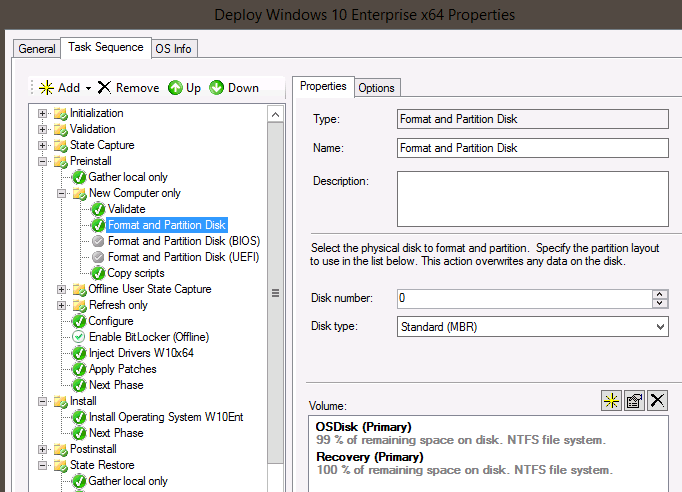
Microsoft Deployment Toolkit (MDT) 2013 Update 2 需要手動編輯格式化腳本才能通過 UEFI 建立映像。請按照以下步驟操作。
- 從較舊的現有工作順序中剪下並貼上「格式化和磁碟分割」。
- 停用 BIOS 和 UEFI「格式化和分割磁碟」步驟 ,然後貼上「格式化和分割磁碟」。
- 內部 MDT 指令檔會自動將磁碟機轉換為 GPT 模式 ,並使用 UEFI。
Article Properties
Article Number: 000145255
Article Type: Solution
Last Modified: 22 Aug 2025
Version: 5
Find answers to your questions from other Dell users
Support Services
Check if your device is covered by Support Services.