Intel I218-LM Ethernet Connection Wake Behavior
Summary: Steps for resolving Ethernet Connection Wake Behavior
This article applies to
This article does not apply to
This article is not tied to any specific product.
Not all product versions are identified in this article.
Symptoms
Wake Issues
Users have reported a behavior on Dell systems with the Intel I218-LM Ethernet adapter. The Ethernet loses connection when resuming from sleep or hibernation. The system must be rebooted, or the user must disable or enable the Ethernet adapter to get the connection back.
Cause
No cause information is available.
Resolution
Driver Update
Users have corrected this behavior by disabling the "Allow the computer to turn off this device to save power" option in Device Manager.
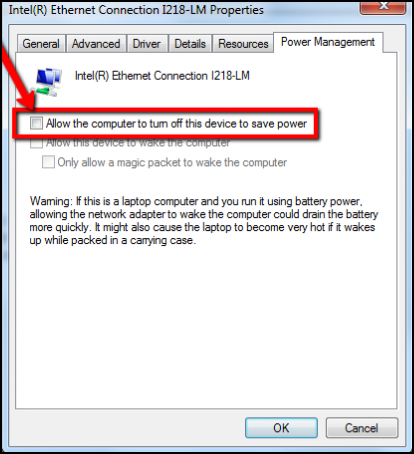
Should the behavior remain, users can update to the latest Ethernet driver from Intel: Network Adapter Driver

Article Properties
Article Number: 000147202
Article Type: Solution
Last Modified: 02 May 2026
Version: 5
Find answers to your questions from other Dell users
Support Services
Check if your device is covered by Support Services.