Intel I218-LM 乙太網路連線喚醒行為
Summary: 解決乙太網路連線喚醒行為的步驟
This article applies to
This article does not apply to
This article is not tied to any specific product.
Not all product versions are identified in this article.
Symptoms
喚醒問題
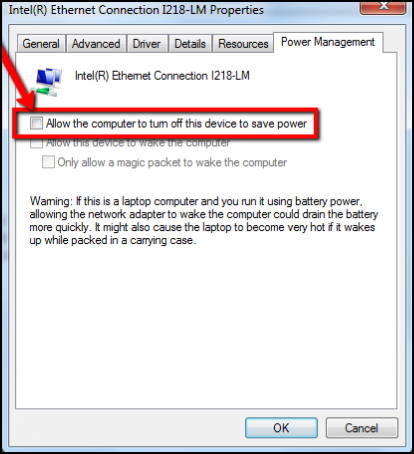
使用者回報 Dell 系統使用 Intel I218-LM 乙太網路配接卡時出現行為。從睡眠或休眠恢復時,乙太網路中斷連接。系統必須重新開機,或者使用者必須停用或啟用乙太網路配接卡,才能恢復連線。
Cause
沒有可用的原因資訊。
Resolution

Article Properties
Article Number: 000147202
Article Type: Solution
Last Modified: 25 Aug 2025
Version: 4
Find answers to your questions from other Dell users
Support Services
Check if your device is covered by Support Services.