Precision 5530 2-in-1: Näppäimistön toimintaopas
Summary: Seuraavassa oppaassa luetellaan Dell Precision 5530 2-in-1 -mobiilityöasemassa käytettävissä olevat pikanäppäimet ja toiminnot.
This article applies to
This article does not apply to
This article is not tied to any specific product.
Not all product versions are identified in this article.
Symptoms
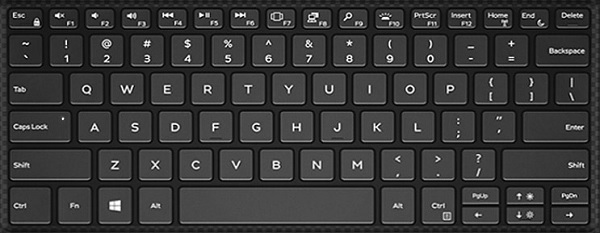
Näppäimistön pikanäppäintoiminnot
Alla olevassa taulukossa luetellaan Precision 5530 2-in-1 -mobiilityöaseman pikanäppäintoiminnot.
Cause
| Toimintonäppäinyhdistelmä | Tulos |
|---|---|
| Fn + F1 | Kaiuttimen mykistys |
| Fn + F2 | Vähennä äänenvoimakkuutta |
| Fn + F3 | Lisää äänenvoimakkuutta |
| Fn + F4 | Kelaus taaksepäin |
| Fn + F5 | Toista/keskeytä |
| Fn + F6 | Eteenpäin |
| Fn + F7 | Käynnistä tehtävänäkymä |
| Fn + F8 | Näytön muuttaminen (Win + P) |
| Fn + F9 | Search |
| Fn + F10 | Kytke taustavalo |
| Fn + F11 | PrtScr |
| Fn + F12 | Insert |
| Fn + Esc | Ota käyttöön tai poista käytöstä Fn-näppäinten lukitus |
| Fn + Home | Langaton yhteys käyttöön / pois käytöstä |
| Fn + End | Sleep |
| Fn + kohdistin ylös | LCD-näytön kirkkauden lisääminen |
| Fn + kohdistin alas | LCD-näytön kirkkauden vähentäminen |
Resolution
 Lisätietoja on Näppäimistöjen tietämyskannassa.
 Lisätietoja on Kosketuslevyn tukisivulla.
 Lisää artikkeleita ja tietoa on myös Hiiren tukisivulla.
Affected Products
Precision 5530 2 in 1Article Properties
Article Number: 000148637
Article Type: Solution
Last Modified: 15 Dec 2025
Version: 5
Find answers to your questions from other Dell users
Support Services
Check if your device is covered by Support Services.