SCCM E Series NIC driver import issue
Summary: Dell OS and Applications Solutions on Dell TechCenter - Project Sputnik, Microsoft Windows, Red Hat Linux, SUSE, Ubuntu, and more
This article applies to
This article does not apply to
This article is not tied to any specific product.
Not all product versions are identified in this article.
Symptoms
 Note: This issue has been corrected with an updated driver release. Please download the latest driver if you are experiencing the issue below.
The Intel NIC drivers for the E-Series notebooks have not been importing correctly into SCCM's OSD due to some missing PNPIDs in the INF files for Vista32 and Vista64. The error in the OSD import is "The selected driver is not applicable to any supported platforms." (See screenshot below.)
The corrected INF files attached below will address this issue. Replace the corresponding files in your NIC driver source files before importing, and they will import correctly. (See screenshot below.)
Use the updated INF files as a workaround until the issue is corrected in a future release of the drivers.
E1y606x64.inf
E1y6032.inf
These updated INF files were used with driver downloads R204518 (Vista32) and R204519 (Vista64), which will show in SCCM as version 9.50.14.2 of the "Intel® 82567LM Gigabit Network Connection" driver. You will need to include this driver in your WinPE boot image.
To extract these drivers for import use the /s /e=<path> command-line switches. The files you need for import are in the payload folder and replace the appropriate INF file.
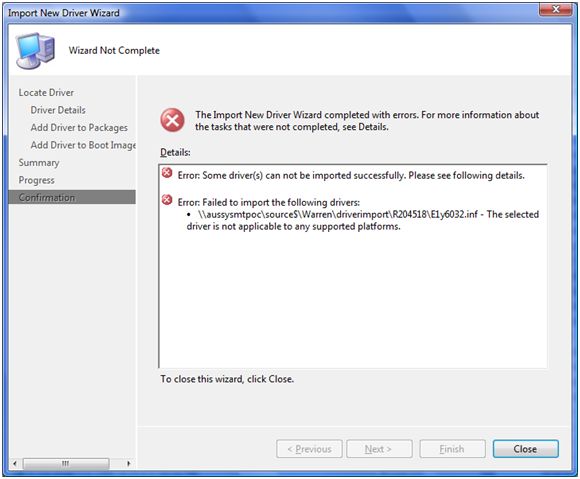
Figure 1: INF File

Figure 2: Import New Driver
Article Properties
Article Number: 000148724
Article Type: Solution
Last Modified: 21 Feb 2021
Version: 3
Find answers to your questions from other Dell users
Support Services
Check if your device is covered by Support Services.