OptiPlex 3040 MFF 마이크가 인식되지 않음
Summary: 이 문서에서는 Dell OptiPlex 3040 MFF(Micro Form Factor) 시스템에서 마이크가 인식되지 않는 문제를 해결하는 방법에 대한 정보를 제공합니다.
This article applies to
This article does not apply to
This article is not tied to any specific product.
Not all product versions are identified in this article.
Symptoms
OptiPlex 3040 MFF 시스템이 시스템에 연결되어 있을 때 마이크가 인식되지 않는 문제가 발생할 수 있습니다.
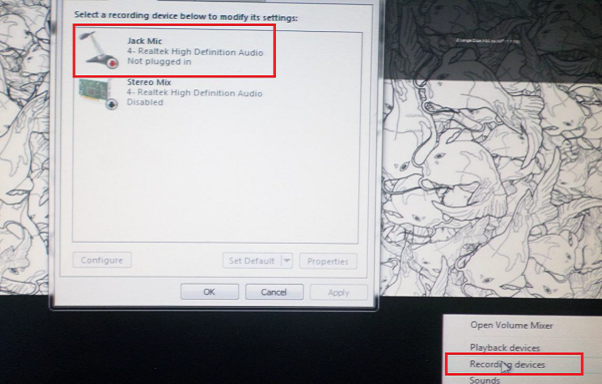
그림 1: 마이크 설정
Cause
일반적으로 이 문제는 오디오 소프트웨어 설정의 오디오 구성 문제와 관련이 있습니다.
Resolution
-
Dell 오디오 스피커 아이콘을 마우스 오른쪽 버튼으로 클릭하고 사운드 매니저를 선택합니다.

-
고급을 클릭합니다.
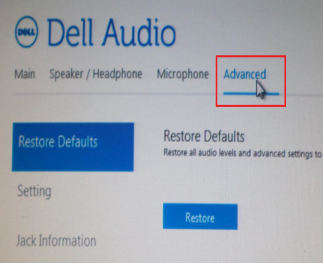
-
Jack Information을 클릭하고 Enable auto popup dialog when a device has been plugged on 옆에 있는 확인란을 선택합니다.

- 마이크를 시스템에 연결합니다.
- 나타나는 메뉴에서 Mic-In을 선택합니다.
- 마이크를 테스트합니다.
Affected Products
OptiPlex 3040 MicroArticle Properties
Article Number: 000149418
Article Type: Solution
Last Modified: 07 Oct 2024
Version: 7
Find answers to your questions from other Dell users
Support Services
Check if your device is covered by Support Services.