Dell Latitude E6410 Windows 7 Driver Installation Guide
Summary: This page is a guide to installing Windows 7 Drivers on the Dell Latitude E6410 Laptop
This article applies to
This article does not apply to
This article is not tied to any specific product.
Not all product versions are identified in this article.
Symptoms
Article Summary: This article provides information on the correct order to install drivers for Windows 7 on Latitude E6410.
Microsoft Windows 7
After a clean installation of the Microsoft Windows 7 operating system, you must install the following drivers / software packages in the following sequence.
 NOTE: Some components may or may not be on your system depending on build and specification.
The list below shows which section heading each driver is listed under on the Dell Support website for your system. Before choosing your drivers be sure and select the correct Operating system, I.e. Windows 7 from the drop down list.
- Dell System Software - System Utilities
- Intel Chipset Software Installation Utility - Chipset Drivers
- Intel AMT HECI - Intel AMT HECI
- Video Driver Installation - Video
- IDT 92HDxxx HD Audio - Audio
- Intel Rapid Storage Technology - Serial ATA
- Ricoh R5U24x Memory Card Reader - Chipset
- ST Microelectronics Free Fall Sensor - Chipset
- Intel 825xx Gigabit Platform LAN Network Device - Network
- Intel WiFi Link 6xxx Series WLAN Half-Mini Card - Network
- Intel WiMAX Link 6250 - Network
- Conexant D330,HDA,MDC,v.92 Modem - Modem/Communications
- Dell Wireless 5540 HSPA Mini Card - Modem/Communications
- Dell Wireless 375 Bluetooth Module - Network
- Dell Multi-Touch Touchpad - Mouse, Keyboard & Input Devices
- Dell ControlPoint Security Device Driver Pack - Dell Data Protection
NOTE: Please use this page only as a guide, illustrating how Device Manager will look during driver install. Drivers can be downloaded from Dell Drivers and Downloads
Dell System Software
Install the Dell System Software update from Dell Drivers and Downloads.
Dell System Software is a compilation of critical Microsoft hotfixes & updates and also enables and enhances the smart card controller
Intel Chipset Software Installation Utility
Check if the chipset driver is installed by looking at Device Manager (shown below). Install the Intel chipset update from Dell Drivers and Downloads.

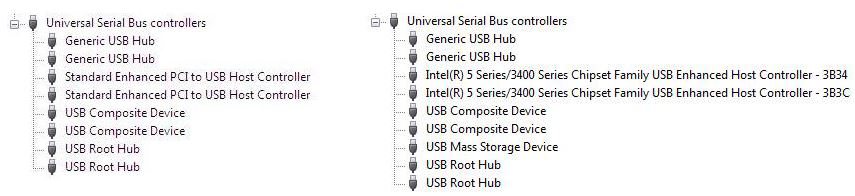
Intel AMT HECI
Install the Intel AMT HECI Package from Dell Drivers and Downloads.

Video Driver Installation
NOTE: If the system supports nVidia Optimus, be sure to install the Intel HD Video driver first, follow by nVidia driver installation later. Install Intel GMA High-Definition Graphics Driver from Dell Drivers and Downloads
Install the nVidia Video Driver or Intel GMA Video Driver from Dell Drivers and Downloads

IDT 92HDxxx HD Audio
Check if the audio driver is installed by looking at Device Manager (shown below). Install the IDT 92HDxxx HD Audio update from Dell Drivers and Downloads.

Intel Rapid Storage Technology
Install the Intel Rapid Storage Technology from Dell Drivers and Downloads.

Ricoh R5U24x Memory Card Reader
Install the media card driver from Dell Drivers and Downloads.
ST Microelectronics Free Fall Sensor
Check if the ST Microelectronics Free Fall Sensor driver is installed by looking at Device Manager (shown below). Install the driver from Dell Drivers and Downloads.

Intel 825xx Gigabit Platform LAN Network Device
Check if the network card driver is installed by looking at Device Manager shown below. It will show an exclamation mark on Ethernet Controller. Install the Intel 825xx Gigabit Platform LAN Network Device update from Dell Drivers and Downloads.

Intel WiFi Link 6xxx Series WLAN Half-Mini Card
Check if the WLAN driver is installed by looking at Device Manager shown below. It will show an exclamation mark on Network Controller. For this example, we're using the Intel 6250 WLAN card. Install the Intel WiFi Link 6xxx Series WLAN Half-Mini Card update from Dell Drivers and Downloads.

Intel WiMAX Link 6250
Check if the WiMAX driver is installed by looking at Device Manager shown below. For this example, we're using the Intel 6250 WLAN card. Install the Intel WiMAX Link 6250 update from Dell Drivers and Downloads.

Conexant D330,HDA,MDC,v.92 Modem
By default a generic Conexant driver is installed however please update the Conexant D330,HDA,MDC,v.92 Modem update from Dell Drivers and Downloads.

Dell Wireless 5540 HSPA Mini Card
Check if the WWAN driver is installed by looking at Device Manager shown below. For this example, we're using the Dell 5540 WWAN card. Install the Dell Wireless 5540 HSPA Mini Card update from Dell Drivers and Downloads.

Dell Wireless 375 Bluetooth Module
By default the Bluetooth driver is installed however please update the Dell Wireless 375 Bluetooth Module update from Dell Drivers and Downloads.

Dell Multi-Touch Touchpad
Check if the touchpad driver is installed by looking at Device Manager shown below. Install the Dell Multi-Touch Touchpad update from Dell Drivers and Downloads.

Dell ControlPoint Security Device Driver Pack
By default the fingerprint driver is not installed. The Dell ControlPoint Security Device Driver Pack can be updated through Dell Drivers and Downloads.

This will install the updated fingerprint reader driver. This driver is only needed when the system is purchased with fingerprint reader.
Affected Products
Latitude E6410Article Properties
Article Number: 000151994
Article Type: Solution
Last Modified: 20 Nov 2020
Version: 2
Find answers to your questions from other Dell users
Support Services
Check if your device is covered by Support Services.