Dell OptiPlex 3040 – Visuelle Anleitung
Summary: Dieser Artikel enthält eine visuelle Anleitung für Dell OptiPlex 3040-, Micro-, SFF- und Mini-Tower-Modelle.
This article applies to
This article does not apply to
This article is not tied to any specific product.
Not all product versions are identified in this article.
Instructions
Inhaltsverzeichnis:
- Micro-Gehäuse (MFF), Vorderseite
- Micro-Gehäuse (MFF), Rückseite
- SFF-Gehäuse (Small Form Factor), Vorderseite
- SFF-Gehäuse (Small Form Factor), Rückseite
- Minitower-Gehäuse (MT), Vorderseite
- Minitower-Gehäuse (MT), Rückseite
Hinweis: Eine detailliertere Beschreibung zu jedem Ort finden Sie in den Systemhandbüchern unter www.dell.com/support/manuals.
1. Micro-Gehäuse (MFF), Vorderseite
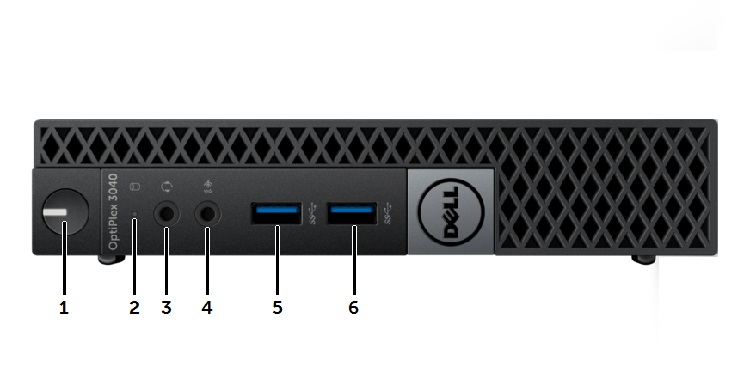
| 1 | Netzschalter, Betriebsanzeige | 2 | Festplattenaktivitätsanzeige |
| 3 | Universeller Audioanschluss | 4 | Line-in-/Mikrofon-Anschluss |
| 5 | USB 3.0-Anschluss | 6 | USB 3.0-Anschluss |
2. Micro-Gehäuse (MFF), Rückseite
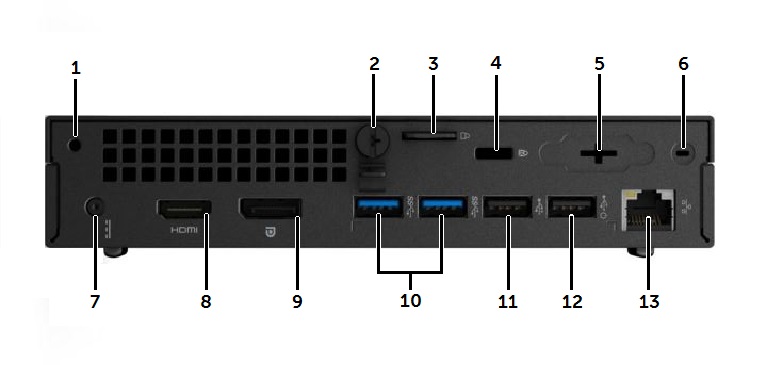
| 1 | Zubehörschraubenbohrung | 2 | Flügelschraube der Abdeckung |
| 3 | Sicherheitsring für Vorhängeschloss | 4 | Kensington-Schloss-Steckplatz |
| 5 | Optionaler VGA-Anschluss oder I/O-Port | 6 | Position des SMA-Anschlusses der Wi-Fi-Antenne |
| 7 | Gleichstromanschluss | 8 | HDMI-Anschluss |
| 9 | DisplayPort-Anschluss | 10 | USB 3.0-Anschlüsse (2 x) |
| 11 | USB-2.0-Anschluss | 12 | USB 2.0-Anschluss mit Wake-Funktion |
| 13 | RJ45-Netzwerkanschluss |
3. SFF-Gehäuse (Small Form Factor), Vorderseite
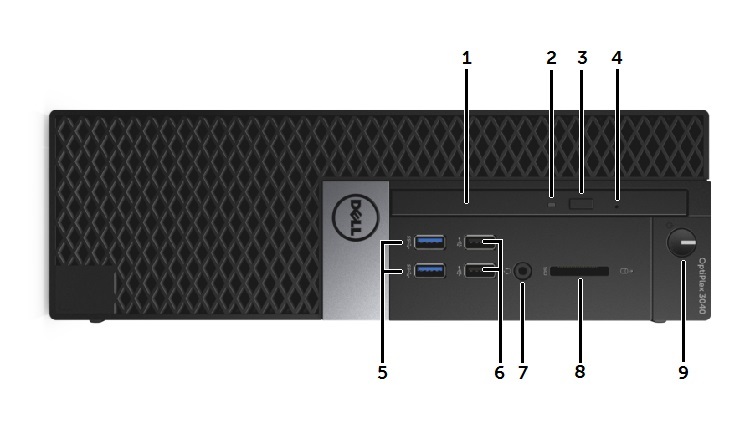
| 1 | Optisches Laufwerk | 2 | LED für optisches Laufwerk |
| 3 | Auswurftaste für optisches Laufwerk | 4 | Stiftloch für Notauswurf des optischen Laufwerks |
| 5 | USB 3.0-Anschluss (2 x) | 6 | USB 2.0-Anschluss (2 x) |
| 7 | Kombianschluss für Kopfhörer/Mikrofon | 8 | SD-Kartensteckplatz |
| 9 | Netzschalter, Betriebsanzeige |
4. SFF-Gehäuse (Small Form Factor), Rückseite
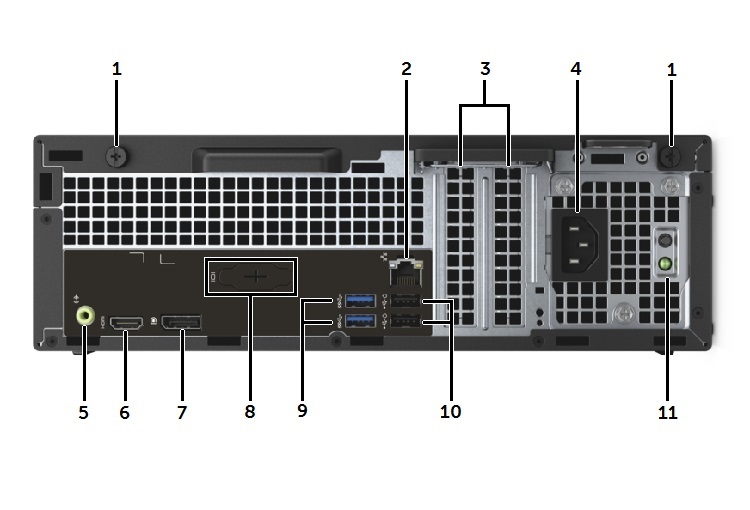
| 1 | Rändelschrauben für Entriegelung der Abdeckung | 2 | RJ45-Netzwerkanschluss |
| 3 | Erweiterungssteckplätze (2 x) | 4 | Netzeingang |
| 5 | Audioausgang | 6 | HDMI-Anschluss |
| 7 | DisplayPort-Anschluss | 8 | Optionaler VGA-Anschluss oder I/O-Port |
| 9 | USB 3.0-Anschlüsse (2 x) | 10 | USB 2.0-Anschlüsse (x2) mit Wake-Funktion |
| 11 | Testtaste und LED des Netzteils |
5. Minitower-Gehäuse (MT), Vorderseite
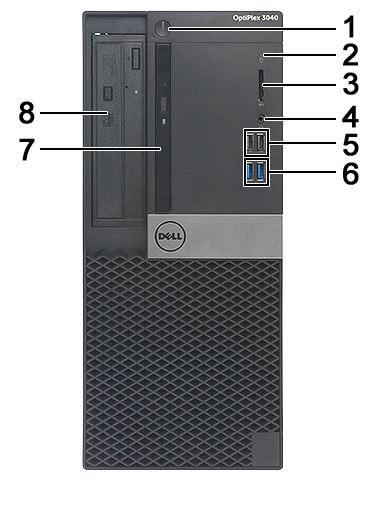
| 1 | Betriebsschalter und LED-Betriebsanzeige | 2 | LED für Festplattenaktivität |
| 3 | SD-Kartensteckplatz | 4 | Kombi-Audio-Anschluss |
| 5 | USB 2.0-Anschlüsse (x2) | 6 | USB 3.0-Anschlüsse (2 x) |
| 7 | Slim-Laufwerksschacht (optional) | 8 | 5,25-Zoll-Laufwerksschacht (optional) |
6. Minitower-Gehäuse (MT), Rückseite
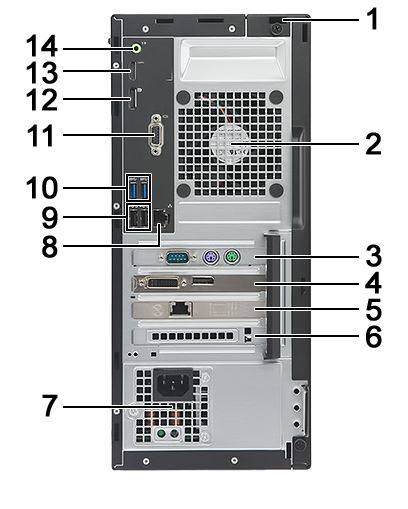
| 1 | Kensington-Schloss-Steckplatz | 2 | Systemlüfter |
| 3 | PCIe x1-Erweiterungsplatinensteckplatz | 4 | PCIe x16-Erweiterungskartensteckplatz |
| 5 | PCIe x1-Erweiterungsplatinensteckplatz | 6 | PCIe x1-Erweiterungsplatinensteckplatz |
| 7 | Netzteil | 8 | RJ45-Netzwerkanschluss |
| 9 | USB 2.0-Anschlüsse (x2) | 10 | USB 3.0-Anschlüsse (2 x) |
| 11 | Optionaler VGA-Anschluss oder I/O-Port | 12 | DisplayPort-Anschluss |
| 13 | HDMI-Anschluss | 14 | Audio-Line-Out-Anschluss |
Affected Products
OptiPlex 3040 Micro, OptiPlex 3040 Small Form Factor, OptiPlex 3040 TowerArticle Properties
Article Number: 000153057
Article Type: How To
Last Modified: 19 Dec 2025
Version: 7
Find answers to your questions from other Dell users
Support Services
Check if your device is covered by Support Services.