Avamar:如何使用 mapall 工具
Summary: Avamar 有一个名为“mapall”的命令行工具,可用于向网格中的一个或多个节点发出指令。本文介绍如何使用该工具。
This article applies to
This article does not apply to
This article is not tied to any specific product.
Not all product versions are identified in this article.
Instructions
本文演示如何使用 mapall 工具,用于从实用程序节点向其他节点发出命令。
而 mapall 工具可以访问在 probe.xml 文件中定义。
这些脚本是标准安全外壳 (ssh) 工具 (ssh) 和安全复制协议 (SCP)),并且都是用 Perl 编写的。
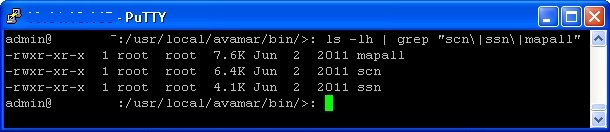
mapall- 向多个节点发送命令- SSN号 - ssh 的包装器,接受(物理)节点编号,而不是 IP 地址或主机名
- SCN号 - SCP的包装器,如上所述
MAPALL:
指定要在其上运行命令的节点:
要仅在选定节点上运行命令,请执行以下作:
要仅在节点 0 上运行该<命令>,请执行以下作:0、0。2 和 0.3:
mapall --nodes=0.0,0.2,0.3 <command>
要在除实用程序节点和 0.0 以外的所有节点上运行该 <命令> ,请执行以下作:
mapall --nodes=all+,-0.s,0.0 <command>
有用标志:
以下是一些可与这三种工具配合使用的有用标志。(这些标记完整记录在 Avamar 技术附录中)
与任何 Avamar 命令行任务一样,运行时要小心谨慎。
与任何 Avamar 命令行任务一样,运行时要小心谨慎。
-
--user=<username> : Specify the user on the remote system that runs the command. -
--verbose : Provides maximum information. -
--quiet : Disable all messages. -
--parallel : Runs the command on all nodes simultaneously. -
--noerror : Do not stop if an error occurs. (This flag should always be used) For legacy reasons, mapall command execution stops if an error occurs. -
--bg : Run the command in the background and does not wait for completion. -
--debug : Enable extended debugging information (for example, which nodes map to which IP addresses). -
--copy : Copies a file from the utility node to remote nodes. -
--get : Pulls a file to the utility node from remote nodes. -
--all : Issues the command on all the data nodes plus the utility node -
--all+ : Issues the command on all the nodes in probe.xml, including NDMP accelerator nodes, spare nodes so forth.
MAPALL 示例:
MAPALL GET:这与复制命令相反。
获取 GSAN 二进制文件,并将其拷贝到 Avamar 应用工具节点,以便 /home/admin/0.*/gsan:
mapall --noerror get 'gsan'
MAPALL 拷贝:
复制 /etc/hosts 文件复制到 /root/etc/hosts 在每个数据节点上。
mapall --noerror --user=root copy 'etc/hosts'
这在实践中是如何工作的:
1.而
mapall copy 命令创建 tarball 包含指定的文件。
2.使用
scp 要将 tarball 到每个节点。
3.解压缩
tarball 在用户主目录中。
Additional Information
SSN 示例:
连接到节点 0.1 并打开交互式 shell。
ssn 0.1
连接到节点 0.2 并发出 date 命令。
ssn 0.2 'date'
SCN 示例:
复制 /home/admin/gsan 从节点 0.1 到 btfix Avamar Utility Node 上的目录。
scn 0.1:/home/admin/gsan ./btfix
复制 ”testscript“ 从实用程序节点的 /home/admin 目录复制到节点 0.2 上,并将其放置为”runscript“在 /data01/cur:
scn testscript 0.2:/data01/cur/runscript
提醒:而
必须在两步作中使用实用程序节点复制文件,或者,也可以使用
scn 命令不能用于将文件从一个数据节点复制到另一个数据节点。
必须在两步作中使用实用程序节点复制文件,或者,也可以使用
scp 直接在两个节点之间传输文件。
Affected Products
Avamar, Avamar ServerProducts
AvamarArticle Properties
Article Number: 000156632
Article Type: How To
Last Modified: 01 Oct 2025
Version: 10
Find answers to your questions from other Dell users
Support Services
Check if your device is covered by Support Services.