PowerFlex Physical disks show the disk's Security Status as Encryption Capable in iDRAC on Dell PowerEdge servers.
Summary: Physical disks show the disk's Security Status as Encryption Capable in iDRAC on Dell PowerEdge servers.
This article applies to
This article does not apply to
This article is not tied to any specific product.
Not all product versions are identified in this article.
Symptoms
RAID controller on the server was replaced.
Physical disks show the disk's Security Status as Encryption Capable in iDRAC on Dell PowerEdge servers.
Selecting Physical Disks in the left pane in iDRAC and clicking Properties tab for Physical disks show the disk's Security Status as Encryption Capable.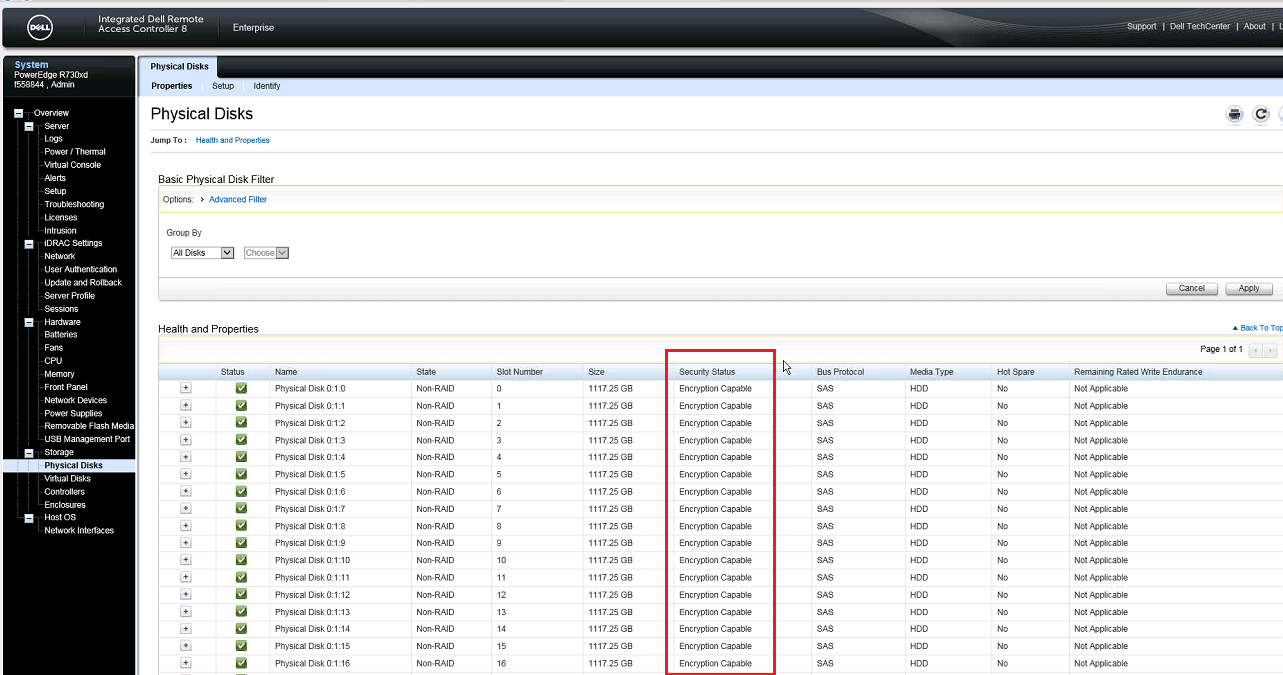
Cause
Some of the Dell PowerEdge servers have the feature of encrypting disks at hardware level. The replacement RAID controller was in HBA mode, all the disks were showing as Non-RAID.
Resolution
Contact Dell hardware tech support (Dell PowerEdge Servers) quoting the following links for assistance:-
How to Secure pre-existing virtual disks:
Dell PowerEdge RAID Controller 9 User’s Guide H330, H730, and H830 | Dell US
Creating a security key
Dell PowerEdge RAID Controller 9 User’s Guide H330, H730, and H830 | Dell US
This is not a ScaleIO issue.
Article Properties
Article Number: 000158632
Article Type: Solution
Last Modified: 20 Aug 2025
Version: 5
Find answers to your questions from other Dell users
Support Services
Check if your device is covered by Support Services.