VxRail: ESXi host NIC may lose VDS uplink after upgrade or reboot
Summary: During a reboot or upgrade of the host, it may lose the uplink to the vSphere Distributed Switch(VDS). When this occurs, the Network Interface Controller(NIC) must be re-linked to the VDS. ...
This article applies to
This article does not apply to
This article is not tied to any specific product.
Not all product versions are identified in this article.
Symptoms
After system upgrade or ESXi host reboot, vCenter may show the host as unresponsive. We cannot ping the host.
Cause
ESXi host NIC loses VDS uplink.
To list all NICs, run the following command on the host,
esxcfg-nics -l
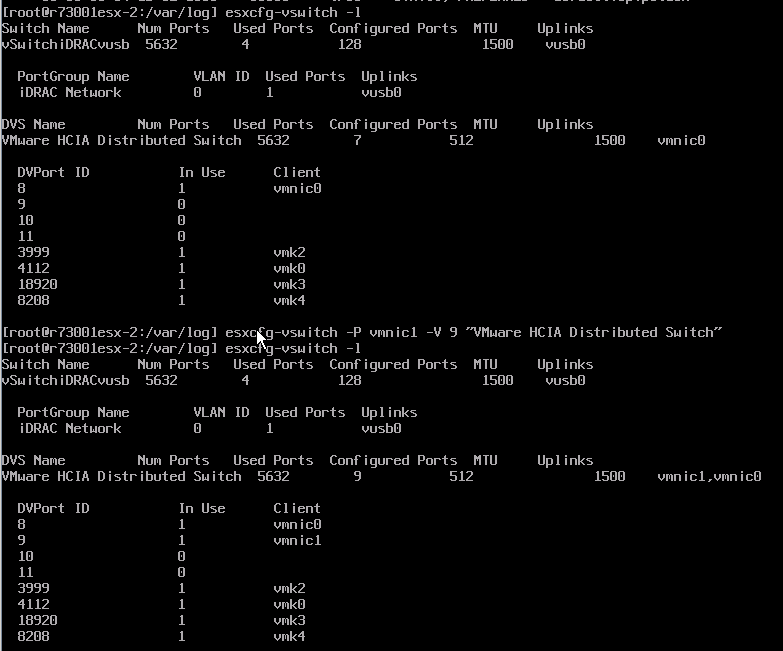
To verify the NIC is linked to vSwitch, run the following command on the host,
esxcfg-vswitch -l
Find the NIC which loses VDS uplink.
Resolution
To link the NIC to vSwitch, run the following command on the host,
esxcfg-vswitch -P <vmnic#> -V <unused_dvPort_ID> <dvSwitch>
Article Properties
Article Number: 000159144
Article Type: Solution
Last Modified: 10 Dec 2024
Version: 4
Find answers to your questions from other Dell users
Support Services
Check if your device is covered by Support Services.