NetWorker: NMC Shows POLICY or WORKFLOW as running but all SESSIONS have completed
Summary: The NetWorker Management Console (NMC) is showing POLICIESWORKFLOWS running but all the clients in the action have completed/failed. Scheduled backup jobs are being missed because the workflow still shows as running. ...
This article applies to
This article does not apply to
This article is not tied to any specific product.
Not all product versions are identified in this article.
Symptoms
- The NetWorker Management Console (NMC) is showing POLICIES\WORKFLOWS running but all the clients in the action have completed/failed.
- Running the
jobkillcommand on the NetWorker server shows that thensrworkflowandsavegrpcommands or processes for the Policy or Workflows are still running. - These processes are also seen with OS process commands:
- Linux:
ps -ef | egrep "savegrp\|nsrworkflow" - Windows:
tasklist | findstr "savegrp nsrworkflow"
- Linux:
- Scheduled backup jobs are being missed because the workflow still shows as running. Seen in the
..\nsr\logs\daemon.raw
153440 MM/DD/YYYY HH:MM:SS 3 1 13 7880 6824 0 networker_servername nsrworkflow SYSTEM error Workflow 'policy_name/workflow_name' aborted: another full instance is already running.
NetWorker: How to use nsr_render_log
- The
daemon.rawalso reports that the jobsdb is not purging (or being deferred) repeatedly due to high server activity.
82341 MM/DD/YYYY 12:09:28 AM 1 9 0 2652 3480 0 networker_servername nsrjobd JOBS notice Server activity is too high for database purge. Deferring purge 30 minutes
82341 MM/DD/YYYY 1:39:32 AM  1 9 0 2652 3480 0 networker_servername nsrjobd JOBS notice Server activity is too high for database purge. Deferring purge 30 minutes
82341 MM/DD/YYYY 2:09:36 AM  1 9 0 2652 3480 0 networker_servername nsrjobd JOBS notice Server activity is too high for database purge. Deferring purge 30 minutes
82341 MM/DD/YYYY 2:39:39 AM  1 9 0 2652 3480 0 networker_servername nsrjobd JOBS notice Server activity is too high for database purge. Deferring purge 30 minutes
82341 MM/DD/YYYY 3:09:43 AM  1 9 0 2652 3480 0 networker_servername nsrjobd JOBS notice Server activity is too high for database purge. Deferring purge 30 minutes
- The sessions can be stopped by killing the "
job id" withjobkillor by restarting the NetWorker server services.
Cause
If the policy\workflow is seen as active from the jobkill command then the status shown in NMC is correct. It is reporting that a POLICY\WORKFLOW is still running because the nsrworkflow process is still running for that workflow. This is preventing the following scheduled backups from running. If the issue was solely with the NMC (no sessions seen with jobkill), the next set of backups would run as scheduled.
This issue can happen if the "Server Parallelism" is too low. Server parallelism is not used to control the startup of backup jobs, but as a final limit of sessions accepted by a backup server.
Resolution
Increase the NetWorker server "Server Parallelism." This can be accessed from the NetWorker Management Console (NMC) under "Server Properties":
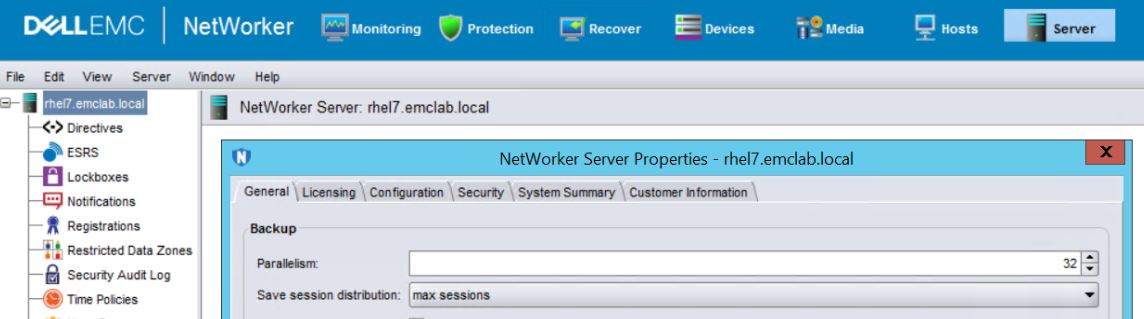
The server parallelism value should be as high as possible while not overloading the backup server itself. The default value when a NetWorker server is deployed is 32; however, this value should be increased as an environment grows (for example: 128, 256, 512, 1024). See the NetWorker Performance Optimization Guide for your NetWorker version for the max server parallelism.
In addition to the Server Parallelism, see the other optimization details in the NetWorker Performance Guide:
- NetWorker kernel parameter requirements
- Sizing information (CPU and Memory requirements).
- For large environments, deploy a standalone NMC server on the same VLAN as the NetWorker server to monitor operations.
The unresponsive sessions can be stopped by either restarting NetWorker services or with the jobkill command utility on the NetWorker server:
Restarting Services:
This option kills any jobs that might be running (e.g: backups, clones, recoveries).
Linux: systemctl restart networker
Windows: net stop nsrd && net start nsrd
Using Jobkill
This option can be used to kill ONLY the unresponsive sessions. Confirm which workflows no longer have any backups running, all the clients show completed or failed, but the Policy\Workflow still shows running.
- Open a root\admin command prompt on the NetWorker server and enter:
jobkill - Enter the '
job id' of workflows\savegrp sessions that must be terminated.
Example: A workflow "Linux" must be stopped. All the clients have finished backing up but the workflow still shows as running:
[root@rhel7 ~]# jobkill
                      job id: 227745;
                        name: savegrp;
                        type: backup action job;
                     command: "savegrp -Z backup:traditional -v";
           NW Client name/id: ;
                  start time: 1535037212;
------------------------------------------------------
                      job id: 227744;
                        name: Filesystem;
                        type: workflow job;
                     command: \
/usr/sbin/nsrworkflow -s rhel7.emclab.local -p Filesystem -w Linux -L;
           NW Client name/id: ;
                  start time: 1535037212;
------------------------------------------------------
Specify jobid to kill ('q' to quit, 'r' to refresh): 227744
Terminating job 227744
Specify jobid to kill ('q' to quit, 'r' to refresh): 227745
Terminating job 227745
Specify jobid to kill ('q' to quit, 'r' to refresh): qui
NOTE: The 'workflow job' contains the workflow name in the 'command' field. The 'savegrp' job does not have a name value; however, it should have the same 'start time' as the 'workflow job' that must be terminated.
Additional Information
Affected Products
NetWorkerProducts
NetWorkerArticle Properties
Article Number: 000160675
Article Type: Solution
Last Modified: 05 Jun 2025
Version: 4
Find answers to your questions from other Dell users
Support Services
Check if your device is covered by Support Services.