VxRail:将 VMDK 添加到 VMware 虚拟机失败,并显示错误“PBM error occurred during PreReconfigureCallback:Fault cause: vmodl.fault.SystemError”
Summary: VxRail:将虚拟机磁盘 (VMDK) 添加到 VMware 虚拟机 (VM) 失败,并显示错误“PBM error occurred during PreReconfigureCallback:Fault cause: vmodl.fault.SystemError”
This article applies to
This article does not apply to
This article is not tied to any specific product.
Not all product versions are identified in this article.
Symptoms
将 VMDK 添加到虚拟机失败,并显示系统错误:
任务:重新配置虚拟机
状态:出现一般系统错误:在 PreReconfigureCallback 期间发生 PBM 错误:故障原因:vmodl.fault.SystemError
启动器:VSPHERE。LOCAL\Administrator
Target:
DB_VM服务器:vcenter.dell.com
vCenter Server VPXD 日志显示连接到虚拟机的 VMDK 的警告“No datastore for disk”(磁盘没有数据存储区),并且未为其设置数据存储区。
root@vcenter [ ~ ]# less /var/log/vmware/vpxd/vpxd.log
2019-06-18T09:21: 41.832Z warning vpxd [16089] [Originator@6876 sub = VmProv opID = jw13m63i-320371-auto-6v78-h5: 70019356-5a] Unable to lookup ds for disk
2019-06-18T09:21:41.839Z info vpxd [16260] [Originator@6876 sub=vpxLro opID=jw13m63i-320371-auto-6v78-h5:70019356-5a] [VpxLRO] -- BEGIN task-33308 -- vm-262 -- vim.VirtualMachine.reconfigure -- 52c2b6af-6def-0b91-af3e-0d8bcc332917(52eb73a4-a3af-3d99-b528-f160c28e5ab1)
2019-06-18T09:21:41.840Z info vpxd[16260] [Originator@6876 sub=vpxLro opID=jw13m63i-320371-auto-6v78-h5:70019356-5a-01] [VpxLRO] -- BEGIN lro-12586921 -- -- VmprovWorkflow --
2019-06-18T09:21:41.843Z info vpxd[16260] [Originator@6876 sub=pbm opID=jw13m63i-320371-auto-6v78-h5:70019356-5a-01] No datastore for disk -101 in config, filePath ds:///vmfs/volumes/vsan:5278d47ab4a915d0-46e19c6052636dd7/
<...>
2019-06-18T09:21:41.923Z info vpxd[16260] [Originator@6876 sub=Default opID=jw13m63i-320371-auto-6v78-h5:70019356-5a] [VpxLRO] -- ERROR task-33308 -- vm-262 -- vim.VirtualMachine.reconfigure: vmodl.fault.SystemError:
--> Result:
--> (vmodl.fault.SystemError) {
--> faultCause = (vmodl.MethodFault) null,-- faultMessage = <unset>,
-->reason = “在 PreReconfigureCallback 期间发生 PBM 错误:>
故障原因:vmodl.fault.SystemError
-- ;>
--> “
--> msg = ”“
--> }
root@vcenter [ ~ ]#
对于虚拟机的 VMDK/s,存储策略合规性显示 Unknown。
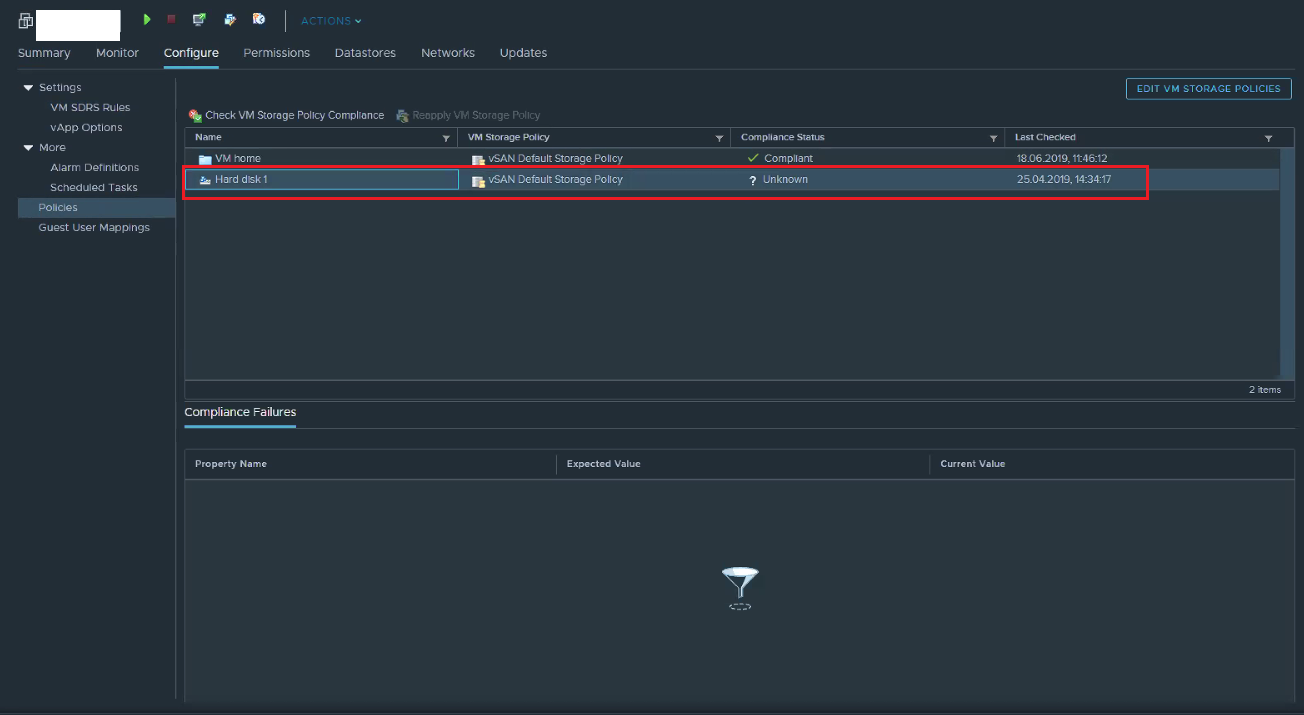
尝试重新检查或更新虚拟机存储合规性失败。
Cause
此问题的确切原因未知,但在从 Hyper-V 转换为 VMware 的虚拟机上观察到此问题。
Resolution
要解决此问题,请按照以下步骤作:
- 关闭现有虚拟机
- 将虚拟机克隆到新虚拟机
- 检查克隆虚拟机的存储策略合规性,并确保其在 VMDK 上显示“合规”
- 将新的 VMDK 添加到克隆的虚拟机
- 打开克隆的虚拟机
Affected Products
VxRail, VxRail Appliance Series, VxRail SoftwareArticle Properties
Article Number: 000166901
Article Type: Solution
Last Modified: 22 May 2025
Version: 4
Find answers to your questions from other Dell users
Support Services
Check if your device is covered by Support Services.