ViPR Controller: VALUE_ILLEGAL: Value "VirtualSCSI" of ResourceSubType element not found in [lsilogic, lsilogic as]
Summary: ViPR-C 3.5 installation fails when deploying via VMware vSphere 6.5 web client
This article applies to
This article does not apply to
This article is not tied to any specific product.
Not all product versions are identified in this article.
Symptoms
The user upgraded VMware vCenter web client from version 6.0 to 6.5
| The user is unable to install the ViPR Controller 3.5 OVA with VMware vCenter 6.5 web client The following errors appear when trying to deploy: VALUE_ILLEGAL: Value "VirtualSCSI" of ResourceSubType element not found in [lsilogic, lsilogic as]. VALUE_ILLEGAL: Value "3" of Parent element does not refer to a ref of type DiskControllerReference. 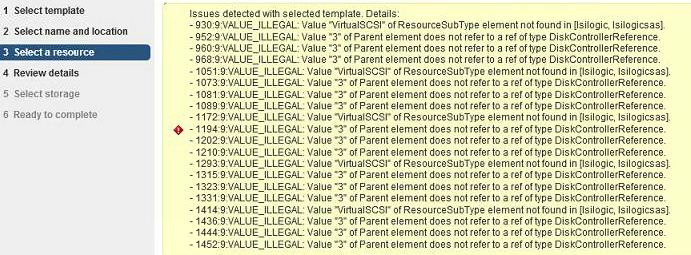
Problem Description During the installation of ViPR Controller 3.5 OVA using VMware vCenter 6.5 web client, the install process fails with the inability to find/process certain object references and will not allow or complete the installation. |
Cause
The user upgraded VMware vCenter web client from version 6.0 to 6.5.
Vmware vCenter 6.5 web client does not accept and install pre-ViPR Cotnroller 3.6 OVA/OVF deployment files.
Vmware vCenter 6.5 web client does not accept and install pre-ViPR Cotnroller 3.6 OVA/OVF deployment files.
Resolution
Install ViPR Controller 3.5 OVA using VMware vCenter 6.0 web client.
Article Properties
Article Number: 000168041
Article Type: Solution
Last Modified: 25 Apr 2025
Version: 3
Find answers to your questions from other Dell users
Support Services
Check if your device is covered by Support Services.