Isilon OneFS:共有パスの大文字と小文字の区別を変更した後、WebUIで共有権限を変更できない
Summary: 共有パスの大文字と小文字の区別を変更した後、パスが存在しない場合、WebUIは共有を変更できません。
This article applies to
This article does not apply to
This article is not tied to any specific product.
Not all product versions are identified in this article.
Symptoms
共有パスの大文字と小文字の区別を変更した後で共有権限を変更しようとしても、共有権限は更新されません。これは、ファイル システムにパスが存在しないためです。
Path '/ifs/data/TesT' not found: No such file or directory
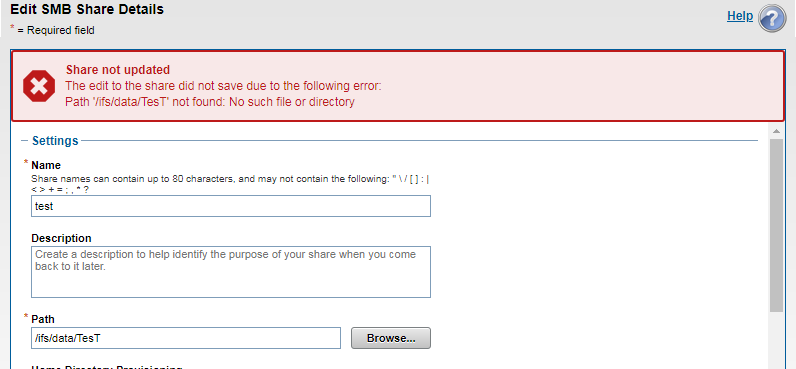
共有ビューを次に示します。
12freight-1# isi smb shares view test
                                     Share Name: test
                                           Path: /ifs/data/TesT
                                    Description:
                     Client-side Caching Policy: manual
Automatically expand user names or domain names: False
Automatically create home directories for users: False
                                      Browsable: True
Permissions:
Account  Account Type  Run as Root  Permission Type  Permission
----------------------------------------------------------------
Everyone wellknown     False        allow            read
nobody   user          False        allow            change
----------------------------------------------------------------
Total: 2
共有パスは存在しますが、大文字と小文字の区別が一致しないため、完全に別のパスとして扱われます。
12freight-1# ls -al /ifs/data/TesT
ls: /ifs/data/TesT: No such file or directory
freight-1#

12freight-1# ls -al /ifs/data/test
total 39
drwxr-xr-x +   2 root  wheel   51 Mar 28 05:58 .
drwxrwxrwx    10 root  wheel  267 Mar 30 03:26 ..
-rw-r--r--     1 root  wheel    0 Mar 28 05:58 out.out
-rw-r--r--     1 root  wheel    0 Mar 28 05:58 test.txt
freight-1#
Cause
共有パスの大文字と小文字の区別が変更された場合、Windowsクライアントでは共有がアクセス可能として認識される場合がありますが、Isilon(unix)はそれを別のパスとして扱います。
Resolution
Isilonでは大文字と小文字が区別されるため、共有パスとIsilon側のファイル パスは正確に一致している必要があります。
注:共有名、パス、または権限を変更すると、中断が発生する可能性があります。本番環境で変更を実装する前に、構成の変更をテストすることをお勧めします。
Affected Products
PowerScale OneFSProducts
Isilon, PowerScale OneFS, Isilon X400Article Properties
Article Number: 000168147
Article Type: Solution
Last Modified: 30 Oct 2025
Version: 4
Find answers to your questions from other Dell users
Support Services
Check if your device is covered by Support Services.