Isilon OneFS:變更共用路徑區分大小寫後,無法在 WebUI 中修改共用權限
Summary: 變更共用路徑區分大小寫後,如果路徑不存在,WebUI 將無法修改共用。
This article applies to
This article does not apply to
This article is not tied to any specific product.
Not all product versions are identified in this article.
Symptoms
如果在變更共用路徑區分大小寫後嘗試修改共用權限,則不會更新共用權限。這是因為檔案系統中不存在該路徑:
Path '/ifs/data/TesT' not found: No such file or directory
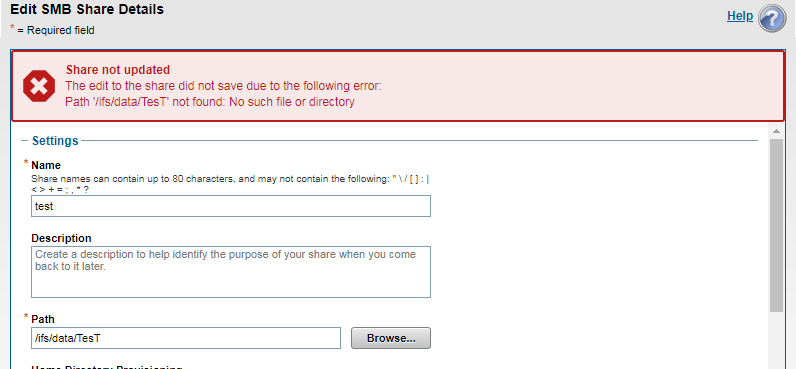
以下是共享檢視:
12freight-1# isi smb shares view test
                                     Share Name: test
                                           Path: /ifs/data/TesT
                                    Description:
                     Client-side Caching Policy: manual
Automatically expand user names or domain names: False
Automatically create home directories for users: False
                                      Browsable: True
Permissions:
Account  Account Type  Run as Root  Permission Type  Permission
----------------------------------------------------------------
Everyone wellknown     False        allow            read
nobody   user          False        allow            change
----------------------------------------------------------------
Total: 2
共用路徑存在,但區分大小寫不匹配,被視為完全獨立的路徑:
12freight-1# ls -al /ifs/data/TesT
ls: /ifs/data/TesT: No such file or directory
freight-1#

12freight-1# ls -al /ifs/data/test
total 39
drwxr-xr-x +   2 root  wheel   51 Mar 28 05:58 .
drwxrwxrwx    10 root  wheel  267 Mar 30 03:26 ..
-rw-r--r--     1 root  wheel    0 Mar 28 05:58 out.out
-rw-r--r--     1 root  wheel    0 Mar 28 05:58 test.txt
freight-1#
Cause
如果共用路徑區分大小寫已變更,Isilon (unix) 會將其視為不同的路徑,儘管 Windows 用戶端仍可能看到共用可存取。
Resolution
Isilon 端的共用路徑和檔案路徑必須完全相符,因為 Isilon 區分大小寫。
注意:變更共用名稱、路徑或權限可能會造成中斷。建議在生產中實施任何更改之前測試任何配置更改。
Affected Products
PowerScale OneFSProducts
Isilon, PowerScale OneFS, Isilon X400Article Properties
Article Number: 000168147
Article Type: Solution
Last Modified: 30 Oct 2025
Version: 4
Find answers to your questions from other Dell users
Support Services
Check if your device is covered by Support Services.