PPMAに「Error: Unable to add host.」というエラーが表示されます。
Summary: PPMAに「Error: Unable to add Host.」というエラーが表示されます。
This article applies to
This article does not apply to
This article is not tied to any specific product.
Not all product versions are identified in this article.
Symptoms
PowerPath for Linuxを実行している新しいLinuxホストが環境に追加されました。
PowerPath for Linuxを実行しているLinuxホストをPPMAに追加すると、PPMAから次のエラーが返されます。」Error: Unable to add Host」の出力です。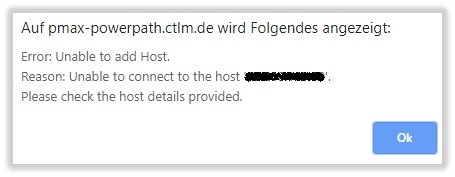
Cause
PowerPath for Linuxでは、管理コンポーネントはデフォルトで無効になっています。
Resolution
次の手順に従って、LinuxホストでPowerPath for Linuxの管理コンポーネントを有効にします
Linuxでの管理コンポーネントの構成:
管理コンポーネントはPowerPathパッケージに含まれています。別途インストールする必要はありません。この手順では、管理コンポーネントを構成する方法について説明します。
- 管理コンポーネントを有効にします。rootとして、次のように入力します。
# /sbin/emcp_mond_edit
- エディタを起動します。ここで、
emcp_mond.confファイルがマシン上に存在しない場合、エディターはサンプル構成を読み取ります。
- 管理コンポーネントはデフォルトで無効になっています。デフォルトの構成パラメーター値を使用して管理コンポーネント サービスを有効にするには、1と6を入力して変更を確認し、保存します。次に、管理コンポーネントを終了、保存、再起動するオプションの番号を入力します。
デフォルトの構成パラメーターを使用することをお勧めします。
構成パラメーターを変更するには、「LinuxおよびUnixでの構成パラメーターの変更」に進みます。
- エディタを起動します。ここで、
- 次のことを確認します。
emcp_mondが実行中で、PowerPath管理コンポーネントが起動していること。# pgrep -xl emcp_mond
または、メッセージ ログを確認して管理コンポーネントのインストールが正常に完了し、起動します。# tail /var/log/ messages
メッセージ ログには、次のようなメッセージが含まれます。<date time hostname>PowerPath: Management Component: Info: Attempting to start. Version: 5.3.SP1-b044.<date time hostname>PowerPath: Management Component: Info: Config parameters valid. Config: port#=9083, heartbeat interval=10 mins, singlePathGkOk=1<date time hostname>PowerPath: Management Component: Info: Service started.
- PowerPath管理コンポーネントをインストールしたホストに、管理コンポーネントが正しくインストールされていることを確認します。
# rpm -qa | grep EMC
次のような出力が表示されます。EMCpower.MgmtComponent.LINUX-5.3.2.00.00-046EMCpower.LINUX-5.3.1.02.00-007
出力には、管理コンポーネント パッケージがインストールされていることが示されます。
Additional Information
PPMAのインストールおよび管理ガイドを参照してください:https://support.emc.com/docu91250_PowerPath_Management_Appliance_2.4_and_Minor_Releases_Installation_and_Configuration_Guide.pdf?language=en_US
Products
PowerPath/VE for VMwareArticle Properties
Article Number: 000168398
Article Type: Solution
Last Modified: 17 Feb 2026
Version: 4
Find answers to your questions from other Dell users
Support Services
Check if your device is covered by Support Services.