PPMA에 "오류: 호스트를 추가할 수 없습니다." 오류 메시지가 표시됩니다. Linux용 PowerPath를 실행하는 호스트를 추가하는 동안
Summary: PPMA에 "오류: 호스트를 추가할 수 없습니다." 오류 메시지가 표시됩니다.
This article applies to
This article does not apply to
This article is not tied to any specific product.
Not all product versions are identified in this article.
Symptoms
PowerPath for Linux를 실행하는 새 Linux 호스트가 환경에 추가되었습니다.
Linux용 PowerPath를 실행하는 Linux 호스트를 PPMA에 추가하는 동안 PPMA에서 다음 오류가 반환됩니다. "Error: Unable to add Host"로 변경되었습니다.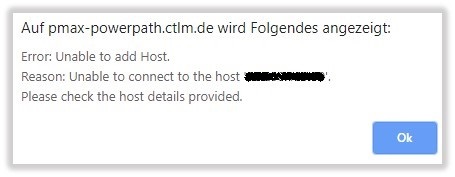
Cause
Linux용 PowerPath에서는 관리 구성 요소가 기본적으로 비활성화되어 있습니다.
Resolution
다음 단계에 따라 Linux 호스트에서 Linux용 PowerPath의 관리 구성 요소를 활성화합니다.
Linux에서 관리 구성 요소 구성:
관리 구성 요소는 PowerPath 패키지에 포함되어 있습니다. 별도로 설치할 필요가 없습니다. 이 절차에서는 관리 구성 요소를 구성하는 방법에 대해 설명합니다.
- Management Component를 활성화합니다. 루트로 다음을 입력합니다.
# /sbin/emcp_mond_edit
- 에디터를 시작합니다. 만일
emcp_mond.conf시스템에 파일이 존재하지 않으면 편집기가 샘플 구성을 읽습니다.
- 관리 구성 요소는 기본적으로 비활성화되어 있습니다. 기본 구성 매개변수 값을 사용하여 관리 구성 요소 서비스를 활성화하려면 1 및 6을 입력하여 변경 사항을 확인하고 저장합니다. 그런 다음 Management Component를 종료, 저장 및 재시작하는 옵션의 번호를 입력합니다.
기본 구성 매개변수를 사용하는 것이 좋습니다.
구성 매개변수를 수정하려면 "Linux 및 Unix에서 구성 매개변수 수정"으로 이동합니다.
- 에디터를 시작합니다. 만일
- 다음을 확인합니다.
emcp_mond가 실행 중이고 해당 PowerPath Management Component가 시작되었습니다.# pgrep -xl emcp_mond
또는 메시지 로그를 확인하여 관리 구성 요소가 성공적으로 설치되었는지 확인하고 시작합니다.# tail /var/log/ messages
메시지 로그에는 다음과 같은 메시지가 포함됩니다.<date time hostname>PowerPath: Management Component: Info: Attempting to start. Version: 5.3.SP1-b044.<date time hostname>PowerPath: Management Component: Info: Config parameters valid. Config: port#=9083, heartbeat interval=10 mins, singlePathGkOk=1<date time hostname>PowerPath: Management Component: Info: Service started.
- PowerPath 관리 구성 요소를 설치한 호스트에 관리 구성 요소가 올바르게 설치되어 있는지 확인합니다.
# rpm -qa | grep EMC
다음과 같은 출력이 표시됩니다.EMCpower.MgmtComponent.LINUX-5.3.2.00.00-046EMCpower.LINUX-5.3.1.02.00-007
출력은 관리 구성 요소 패키지가 설치되어 있음을 보여줍니다.
Additional Information
PPMA 설치 및 관리 가이드: https://support.emc.com/docu91250_PowerPath_Management_Appliance_2.4_and_Minor_Releases_Installation_and_Configuration_Guide.pdf?language=en_US 를 참조하십시오.
Products
PowerPath/VE for VMwareArticle Properties
Article Number: 000168398
Article Type: Solution
Last Modified: 17 Feb 2026
Version: 4
Find answers to your questions from other Dell users
Support Services
Check if your device is covered by Support Services.