PPMA 顯示「錯誤:無法新增主機。」,同時新增執行 Linux PowerPath 的主機
Summary: PPMA 顯示「錯誤:無法新增主機」。
This article applies to
This article does not apply to
This article is not tied to any specific product.
Not all product versions are identified in this article.
Symptoms
執行適用於 Linux 之 PowerPath 的新 Linux 主機新增至環境,
將執行 Linux 適用之 PowerPath 的 Linux 主機新增至 PPMA 時,PPMA 傳回錯誤:」Error: Unable to add Host.」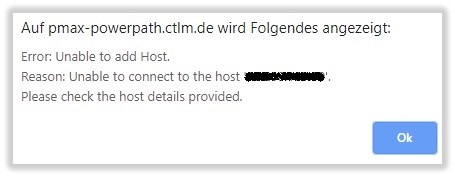
Cause
Linux 的 PowerPath 上的管理元件預設為停用。
Resolution
依照以下步驟,在 Linux 主機上啟用 Linux 的 PowerPath 管理元件:
配置 Linux 上的管理元件:
管理元件包含在 PowerPath 套裝中。不需要單獨安裝。此過程描述如何配置管理元件。
- 啟用管理元件。以 root 身分輸入
# /sbin/emcp_mond_edit
- 啟動編輯器。如果
emcp_mond.conf計算機上不存在檔,編輯器會讀取範例配置。
- 管理元件預設為停用。若要使用預設配置參數值啟用管理元件服務,請鍵入 1 和 6 以確認更改並保存。然後鍵入退出、保存和重新啟動管理元件的選項編號。
建議使用預設的組態參數。
若要修改組態參數,請前往「修改 Linux 和 Unix 上的組態參數」。
- 啟動編輯器。如果
- 確認
emcp_mond正在執行,且該 PowerPath Management 元件已啟動。# pgrep -xl emcp_mond
或者,驗證消息日誌以成功安裝和啟動管理元件。# tail /var/log/ messages
訊息記錄包含如下訊息:<date time hostname>PowerPath: Management Component: Info: Attempting to start. Version: 5.3.SP1-b044.<date time hostname>PowerPath: Management Component: Info: Config parameters valid. Config: port#=9083, heartbeat interval=10 mins, singlePathGkOk=1<date time hostname>PowerPath: Management Component: Info: Service started.
- 確認在已安裝 PowerPath 管理元件的主機上,管理元件已正確安裝。
# rpm -qa | grep EMC
此時將顯示如下輸出:EMCpower.MgmtComponent.LINUX-5.3.2.00.00-046EMCpower.LINUX-5.3.1.02.00-007
輸出顯示已安裝管理元件包。
Additional Information
請參閱《PPMA 安裝與管理指南》:https://support.emc.com/docu91250_PowerPath_Management_Appliance_2.4_and_Minor_Releases_Installation_and_Configuration_Guide.pdf?language=en_US
Products
PowerPath/VE for VMwareArticle Properties
Article Number: 000168398
Article Type: Solution
Last Modified: 17 Feb 2026
Version: 4
Find answers to your questions from other Dell users
Support Services
Check if your device is covered by Support Services.