Dell VxRail: 업그레이드 환경에서 VMware vCenter Server Platform Services Controller 업그레이드 실행 시 사전 검사 실패
Summary: VMware vCenter Server Platform Services Controller 업그레이드 실행 중 사전 검사 실행 실패로 업그레이드가 실패하고 다음 오류가 발생합니다. 패치 ISO가 유효한지 확인합니다.
This article applies to
This article does not apply to
This article is not tied to any specific product.
Not all product versions are identified in this article.
Symptoms
VxRail 업그레이드가 실패하고 "VMware vCenter Server Platform Services Controller 업그레이드 실행 중 시험 구동 사전 검사 실패 오류"라는 오류가 표시됩니다.
lcm.log:
2019-05-12T09:22:20.198+0000 ERROR [pool-9-thread-1] com.vce.lcm.service.checker.upgrade.PSCDryRunPrechecker PSCDryRunPrechecker.performDryRun:118 - Dry run pre-check failure in execution for VMware vCenter Server Platform Services Controller upgrade with error: ..
2019-05-12T09:22:20.199+0000 INFO  [pool-9-thread-1] com.vce.lcm.service.LCMServiceImpl LCMServiceImpl.handleUpgradeException:1541 - handling upgrade exception.
2019-05-12T09:22:20.201+0000 INFO  [pool-9-thread-1] com.vce.lcm.service.LCMServiceImpl LCMServiceImpl.setStatusToUpgradeFailed:1531 - set bundle VMware vCenter Server Appliance status to upgrade failed
2019-05-12T09:22:20.201+0000 ERROR [pool-9-thread-1] com.vce.lcm.service.LCMServiceImpl LCMServiceImpl.handleUpgradeException:1569 - failed to upgrade: VXRAIL_COMPOSITE-4.7.200-13531219_for_4.7.x.zip, with exception:
com.vce.lcm.exception.LCMInternalException: Failure running upgrade script.
        at com.vce.lcm.service.checker.upgrade.PSCDryRunPrechecker.performDryRun(PSCDryRunPrechecker.java:120) ~[lcm_module-4.7.200.jar:?]
        at com.vce.lcm.service.checker.upgrade.AbstractApplianceDryRunPrechecker.performCheck(AbstractApplianceDryRunPrechecker.java:62) ~[lcm_module-4.7.200.jar:?]
        at com.vce.lcm.helper.LCMUtilService.executeIndividualCheck(LCMUtilService.java:758) ~[lcm_module-4.7.200.jar:?]
Cause
이 문제는 다음과 같은 이유로 발생합니다.
- VxRail 복합 .zip 파일이 손상되었거나 다운로드 중에 문제가 발생했습니다.
Resolution
아래 단계를 따라 컴포지트가 손상되었는지 확인합니다.
-
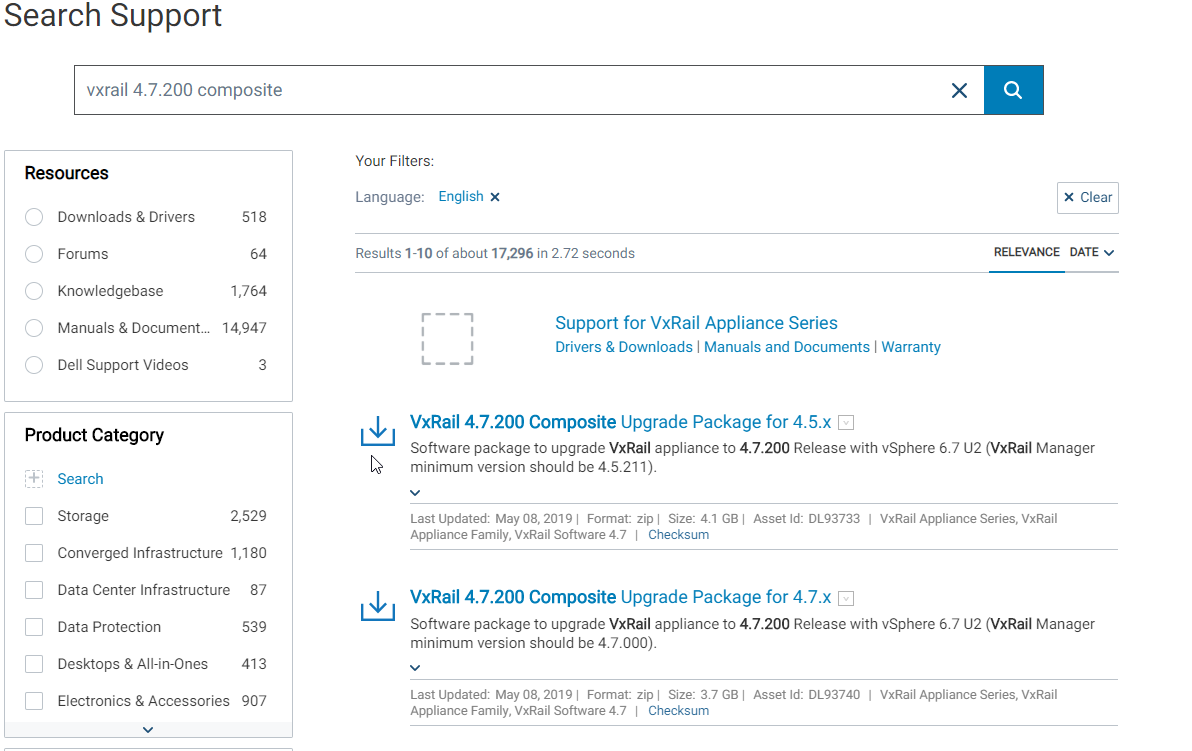
예를 들어 타겟 복합 업그레이드를 검색합니다. 4.7.x용 VxRail 4.7.200 복합 업그레이드 패키지
-
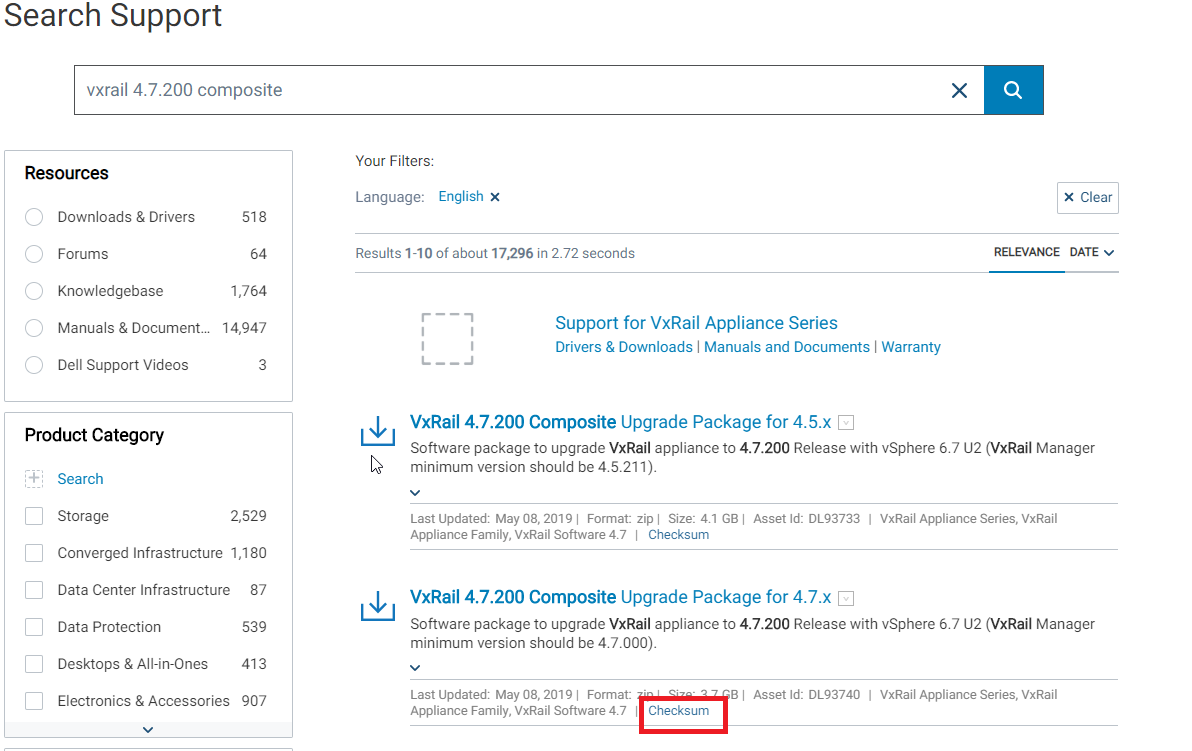
찾은 결과에서 체크섬을 누릅니다.
-
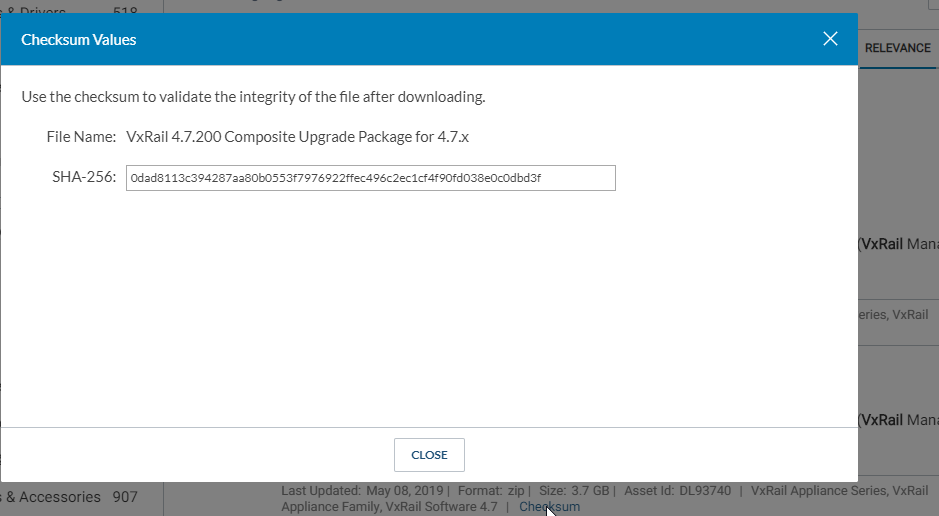
다음과 같이 Hash 알고리즘이 사용된 Hash 키를 보여줍니다.
-
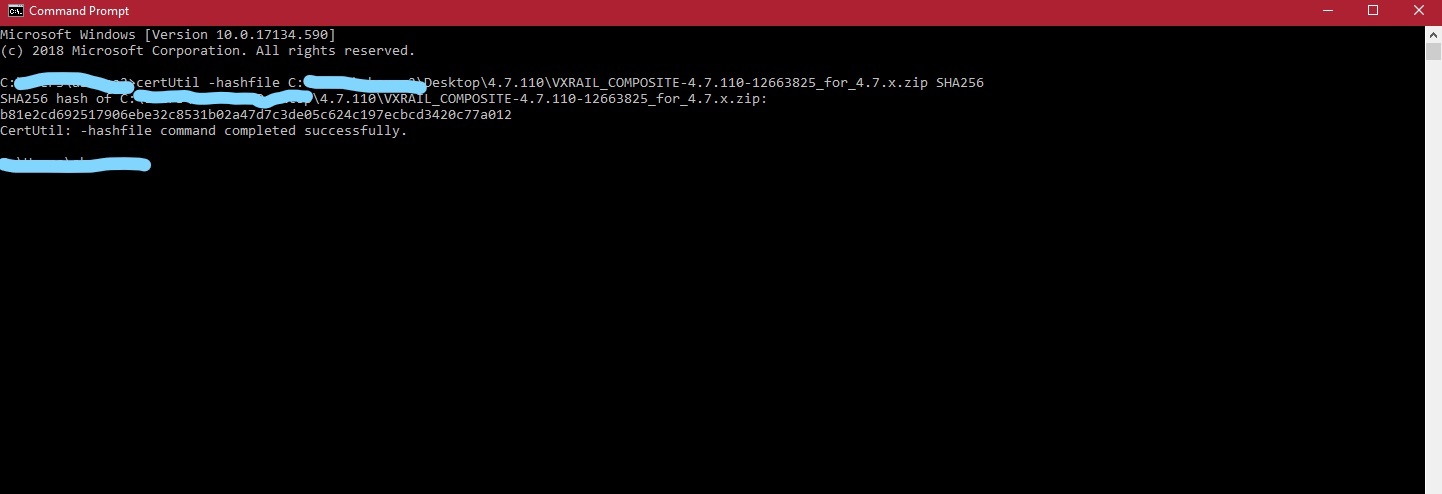
손상된 업그레이드 복합이 있는 로컬 머신에서 cmd를 열고 다음 명령을 실행합니다.
certUtil -hashfile pathToFileToCheck [HashAlgorithm]
예:
certUtil -hashfile C:\Downloads\VXRAIL_COMPOSITE-4.7.200-13531219_for_4.7.x.zip SHA256
HashAlgorithm 선택 항목은 다음과 같습니다. MD2, MD4, MD5, SHA1, SHA256, SHA384, SHA512
-
cmd에서 생성 된 해시 키를 support.emc.com 에서 발견 된 해시 키와 비교하고 일치하지 않으면 다운로드 한 복합 항목이 손상되었음을 의미합니다.
-
컴포지트를 다시 다운로드하고 이전 두 단계를 반복하여 새 복제본이 올바르게 다운로드되었는지 확인합니다.
-
VxRail Manager에서 스냅샷을 생성한 경우 이전 업그레이드를 시작하기 전에 해당 스냅샷으로 되돌리고 새로 다운로드한 업그레이드 복합 스냅샷을 사용하여 업그레이드를 재시도합니다.
-
스냅샷이 생성되지 않은 경우 스냅샷을 생성하고 다음 세 단계를 수행합니다.
- VxRail Manager VM에서 아래 명령을 사용하여 Mystic DB를 엽니다.
psql -U postgres mysticmanager;
- 다음 명령을 실행하여 업그레이드 상태를 HAS_NEWER으로 재설정합니다.
update virtual_appliance set upgrade_status='HAS_NEWER'where component_id='VXRAIL_SYSTEM';
- 아래 명령을 사용하여 runjars 및 vmware-marvin 서비스를 다시 시작합니다.
systemctl restart vmware-marvin
systemctl restart runjars
- VxRail Manager VM에서 아래 명령을 사용하여 Mystic DB를 엽니다.
Affected Products
VxRail Appliance Family, VxRail D560Products
Pivotal Ready Architecture, VxRail 460 and 470 Nodes, VxRail Appliance Family, VxRail Appliance Series, VxRail G410, VxRail G Series Nodes, VxRail D560F, VxRail E460, VxRail E560, VxRail E560F, VxRail E560N, VxRail E660F, VxRail E660N, VxRail E665
, VxRail E665F, VxRail E665N, VxRail G560, VxRail G560F, VxRail Gen2 Hardware, VxRail P Series Nodes, VxRail P470, VxRail P570, VxRail P570F, VxRail P580N, VxRail P670N, VxRail P675F, VxRail P675N, VxRail S470, VxRail S570, VxRail S670, VxRail Software, VxRail V Series Nodes, VxRail V470, VxRail V570, VxRail V570F
...
Article Properties
Article Number: 000168419
Article Type: Solution
Last Modified: 20 Mar 2025
Version: 8
Find answers to your questions from other Dell users
Support Services
Check if your device is covered by Support Services.