NVE:インストールが「Error: パスワード ポリシーを検証できませんでした」
Summary: NetWorkerサービスの構成時にパスワード ポリシー違反が原因で、NetWorker Virtual Edition(NVE)のインストールの進行が失敗します。
This article applies to
This article does not apply to
This article is not tied to any specific product.
Not all product versions are identified in this article.
Symptoms
OVAが正常に導入された後に、NetWorker Virtual Edition(NVE)環境が構成されている。NetWorker Installation Manager (avigui) を使用して、さまざまなアカウント パスワードのNetWorker構成の詳細を入力します。インストールの進行が、次のステップで失敗します。 NetWorker Authc Service with "Error: Could not validating password policy."
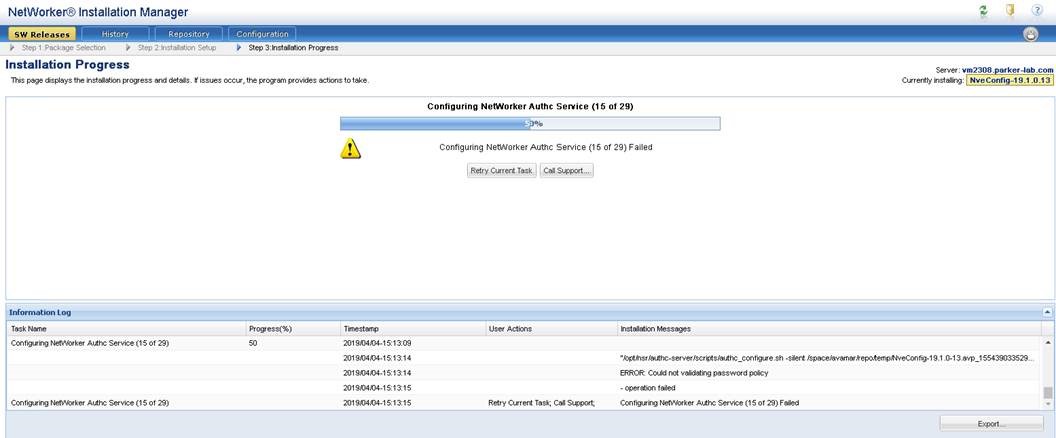
図1: NVE avinstaller インターフェイスに、インストールが50%で停止していることが表示されます。
Cause
「Authc Admin Password」に等号(=)が含まれており、NVEパスワードの複雑性チェックに有効な特殊文字ではありません。要件は、「Authc Admin Password」 の説明の詳細に示されています。
Enter the password for the Authc Service admin user (nine or more characters with at least one digit, one lowercase, one uppercase, and one character that is not a digit, lowercase, uppercase, or equal sign).

図2:認証サービスのパスワード要件
Resolution
vSphere環境にNVE OVAを再導入し、正しいパスワード要件を使用していることを確認します。
- 9文字以上
- 少なくとも 1 つの数字
- 小文字
- 大文字
- 特殊文字1文字(パスワードに等号(=)を使用しないでください)。
Article Properties
Article Number: 000170284
Article Type: Solution
Last Modified: 27 Oct 2025
Version: 4
Find answers to your questions from other Dell users
Support Services
Check if your device is covered by Support Services.