ViPR cannot create a volume with an existing consistency group
Summary: When creating volume with an existing ViPR CG, the order fails with the error "unable to call Storage Provider successfully caused by: The requested object cannot be found."
This article applies to
This article does not apply to
This article is not tied to any specific product.
Not all product versions are identified in this article.
Symptoms
When creating a volume with an existing VIPR CG, the order fails with the error :
"Unable to call Storage Provider successfully. Caused by: The requested object cannot be found".
Creating a new CG and re-running the order with the new CG selected ran successfully. So the issue is caused by the original stale CG.
Cause
From ViPR logs, we can see the below error which means the ReplicationGroup on SMI-S does not exist.
"ERROR ExecutionEngineImpl.java (line 107) Order failed: urn:storageos:Order:4595e83d-0e3b-4cc2-aa15-558bf7de7ef2:vdc1
com.emc.vipr.client.exceptions.ServiceErrorException: Error 16001: Unable to call Storage Provider successfully. Caused by: The requested object cannot be found. (com.emc.cmp.osls.se.osl.Replica.StorRepGroupShow():726 C:ERROR_CLASS_SOFTWARE F:ERROR_FAMILY_NOT_FOUND R:1000052 C:ERROR_CLASS_SOFTWARE F:ERROR_FAMILY_NOT_FOUND R:1000052) "
Evidence:
1. The Stale consistency group :
id: urn:storageos:BlockConsistencyGroup:xxxxxxxx-xxxx-xxxx-xxxx-xxxxxxxxxxxx:vdc1
label = CXL_CG
requestedTypes = StringSet [VPLEX, LOCAL]
storageDevice = URI: urn:storageos:StorageSystem:xxxxxxxx-xxxx-xxxx-xxxx-xxxxxxxxxxxx:vdc1
systemConsistencyGroups = {urn:storageos:StorageSystem:xxxxxxxx-xxxx-xxxx-xxxx-xxxxxxxxxxxx:vdc1=[5583B817], urn:storageos:StorageSystem:xxxxxxxx-xxxx-xxxx-xxxx-xxxxxxxxxxxx:vdc1=[55870BA7], urn:storageos:StorageSystem:xxxxxxxx-xxxx-xxxx-xxxx-xxxxxxxxxxxx:vdc1=[cluster-1:CXL_CG]}
types = StringSet [VPLEX, LOCAL]
2. The new-created consistency group which allowed volume creation to succeed:
id: urn:storageos:BlockConsistencyGroup:xxxxxxxx-xxxx-xxxx-xxxx-xxxxxxxxxxxx:vdc1
label = FIS
requestedTypes = StringSet [VPLEX]
storageDevice = URI: urn:storageos:StorageSystem:xxxxxxxx-xxxx-xxxx-xxxx-xxxxxxxxxxxx:vdc1
systemConsistencyGroups = {urn:storageos:StorageSystem:xxxxxxxx-xxxx-xxxx-xxxx-xxxxxxxxxxxx:vdc1=[5908C980], urn:storageos:StorageSystem:xxxxxxxx-xxxx-xxxx-xxxx-xxxxxxxxxxxx:vdc1=[58FEC701], urn:storageos:StorageSystem:xxxxxxxx-xxxx-xxxx-xxxx-xxxxxxxxxxxx:vdc1=[cluster-1:FIS]}
types = StringSet [VPLEX, LOCAL]
3. CG "CXL_CG" for two storage systems with two Instance ID.
id: urn:storageos:StorageSystem:xxxxxxxx-xxxx-xxxx-xxxx-xxxxxxxxxxxx:vdc1
label = CLARIION+CETVxxxxxxxxx1
Instance ID: 5583B817
id: urn:storageos:StorageSystem:xxxxxxxx-xxxx-xxxx-xxxx-xxxxxxxxxxxx:vdc1
label = CLARIION+CETVxxxxxxxxx2
Instance ID: 55870BA7
4. In CG "CXL_CG", there are four virtual volumes, four backend volumes from VNX xxx1 and four backend volumes from VNX xxx2.
In the SMI-S provider, when we query the replication group, we find there is no instance ID for consistency group "CXL_CG".
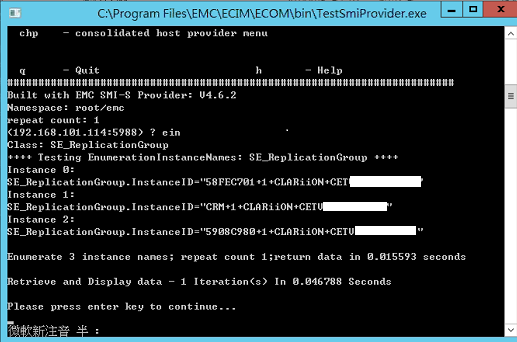
We can only see the Instance ID for the other CG "FIS" and cannot find the CG "CXL_CG".
So there is no InstanceID for this CG in SE_ReplicationGroup which caused the error in the issue.
Customer has previously removed this SMI-S provider and the database disappeared, therefore we cannot find the Instance ID for the old CG which was created before removing SMI-S. This caused these two ReplicationGroup Instance IDs to disappear.
"ERROR ExecutionEngineImpl.java (line 107) Order failed: urn:storageos:Order:4595e83d-0e3b-4cc2-aa15-558bf7de7ef2:vdc1
com.emc.vipr.client.exceptions.ServiceErrorException: Error 16001: Unable to call Storage Provider successfully. Caused by: The requested object cannot be found. (com.emc.cmp.osls.se.osl.Replica.StorRepGroupShow():726 C:ERROR_CLASS_SOFTWARE F:ERROR_FAMILY_NOT_FOUND R:1000052 C:ERROR_CLASS_SOFTWARE F:ERROR_FAMILY_NOT_FOUND R:1000052) "
Evidence:
1. The Stale consistency group :
id: urn:storageos:BlockConsistencyGroup:xxxxxxxx-xxxx-xxxx-xxxx-xxxxxxxxxxxx:vdc1
label = CXL_CG
requestedTypes = StringSet [VPLEX, LOCAL]
storageDevice = URI: urn:storageos:StorageSystem:xxxxxxxx-xxxx-xxxx-xxxx-xxxxxxxxxxxx:vdc1
systemConsistencyGroups = {urn:storageos:StorageSystem:xxxxxxxx-xxxx-xxxx-xxxx-xxxxxxxxxxxx:vdc1=[5583B817], urn:storageos:StorageSystem:xxxxxxxx-xxxx-xxxx-xxxx-xxxxxxxxxxxx:vdc1=[55870BA7], urn:storageos:StorageSystem:xxxxxxxx-xxxx-xxxx-xxxx-xxxxxxxxxxxx:vdc1=[cluster-1:CXL_CG]}
types = StringSet [VPLEX, LOCAL]
2. The new-created consistency group which allowed volume creation to succeed:
id: urn:storageos:BlockConsistencyGroup:xxxxxxxx-xxxx-xxxx-xxxx-xxxxxxxxxxxx:vdc1
label = FIS
requestedTypes = StringSet [VPLEX]
storageDevice = URI: urn:storageos:StorageSystem:xxxxxxxx-xxxx-xxxx-xxxx-xxxxxxxxxxxx:vdc1
systemConsistencyGroups = {urn:storageos:StorageSystem:xxxxxxxx-xxxx-xxxx-xxxx-xxxxxxxxxxxx:vdc1=[5908C980], urn:storageos:StorageSystem:xxxxxxxx-xxxx-xxxx-xxxx-xxxxxxxxxxxx:vdc1=[58FEC701], urn:storageos:StorageSystem:xxxxxxxx-xxxx-xxxx-xxxx-xxxxxxxxxxxx:vdc1=[cluster-1:FIS]}
types = StringSet [VPLEX, LOCAL]
3. CG "CXL_CG" for two storage systems with two Instance ID.
id: urn:storageos:StorageSystem:xxxxxxxx-xxxx-xxxx-xxxx-xxxxxxxxxxxx:vdc1
label = CLARIION+CETVxxxxxxxxx1
Instance ID: 5583B817
id: urn:storageos:StorageSystem:xxxxxxxx-xxxx-xxxx-xxxx-xxxxxxxxxxxx:vdc1
label = CLARIION+CETVxxxxxxxxx2
Instance ID: 55870BA7
4. In CG "CXL_CG", there are four virtual volumes, four backend volumes from VNX xxx1 and four backend volumes from VNX xxx2.
In the SMI-S provider, when we query the replication group, we find there is no instance ID for consistency group "CXL_CG".
We can only see the Instance ID for the other CG "FIS" and cannot find the CG "CXL_CG".
So there is no InstanceID for this CG in SE_ReplicationGroup which caused the error in the issue.
Customer has previously removed this SMI-S provider and the database disappeared, therefore we cannot find the Instance ID for the old CG which was created before removing SMI-S. This caused these two ReplicationGroup Instance IDs to disappear.
Resolution
The ReplicationGroups (& associated member volumes) need to be manually re-created in SMI-S for these two VNX's.
After they are re-created, volume creation will succeed using the original CG.
After they are re-created, volume creation will succeed using the original CG.
Article Properties
Article Number: 000171299
Article Type: Solution
Last Modified: 20 Nov 2020
Version: 2
Find answers to your questions from other Dell users
Support Services
Check if your device is covered by Support Services.