PowerFlex:3.0.1 無法在 PowerFlex 叢集中新增 SDC。新的 SDC 不會顯示在前端標籤中。
Summary: PowerFlex:3.0.1 無法在 PowerFlex 叢集中新增 SDC。新的 SDC 不會顯示在前端標籤中。
This article applies to
This article does not apply to
This article is not tied to any specific product.
Not all product versions are identified in this article.
Symptoms
嘗試新增 SDC
無法在 PowerFlex 叢集中新增 SDC。新的 SDC 不會顯示在前端標籤中。
我們執行了命令:-
esxcli system module parameters set -m scini -p “IoctlIniGuidStr=GUID_GOES_HERE IoctlMdmIPStr=MDM IP 位址”
但是在執行命令後,新的 SDC 沒有顯示在 GUI
的前端標籤中 此外,執行命令「scli --query_all_sdc」並未在輸出中列出新增的 SDC。
1.確認上述命令中使用的 MDM IP 位址為可 ping。
2.也嘗試使用虛擬 IP 以及所有三個 MDM 的資料 IP。
在 AMS 環境中出現問題。在非 AMS 中也可以看到。
無法在 PowerFlex 叢集中新增 SDC。新的 SDC 不會顯示在前端標籤中。
我們執行了命令:-
esxcli system module parameters set -m scini -p “IoctlIniGuidStr=GUID_GOES_HERE IoctlMdmIPStr=MDM IP 位址”
但是在執行命令後,新的 SDC 沒有顯示在 GUI
的前端標籤中 此外,執行命令「scli --query_all_sdc」並未在輸出中列出新增的 SDC。
1.確認上述命令中使用的 MDM IP 位址為可 ping。
2.也嘗試使用虛擬 IP 以及所有三個 MDM 的資料 IP。
在 AMS 環境中出現問題。在非 AMS 中也可以看到。
Cause
SCLI --query_all命令輸出顯示已啟用 MDM 限制 SDC 模式 ,並已選取「核准 IP」選項。這是一項額外的安全功能。
Resolution
運行AMS部署指南中未記錄的過程中未記錄的其他命令。
SCLI --add_sdc --sdc_guid <SDC GUID> --mdm_port 6611
使用上述命令新增 SDC 後,您會在前端標籤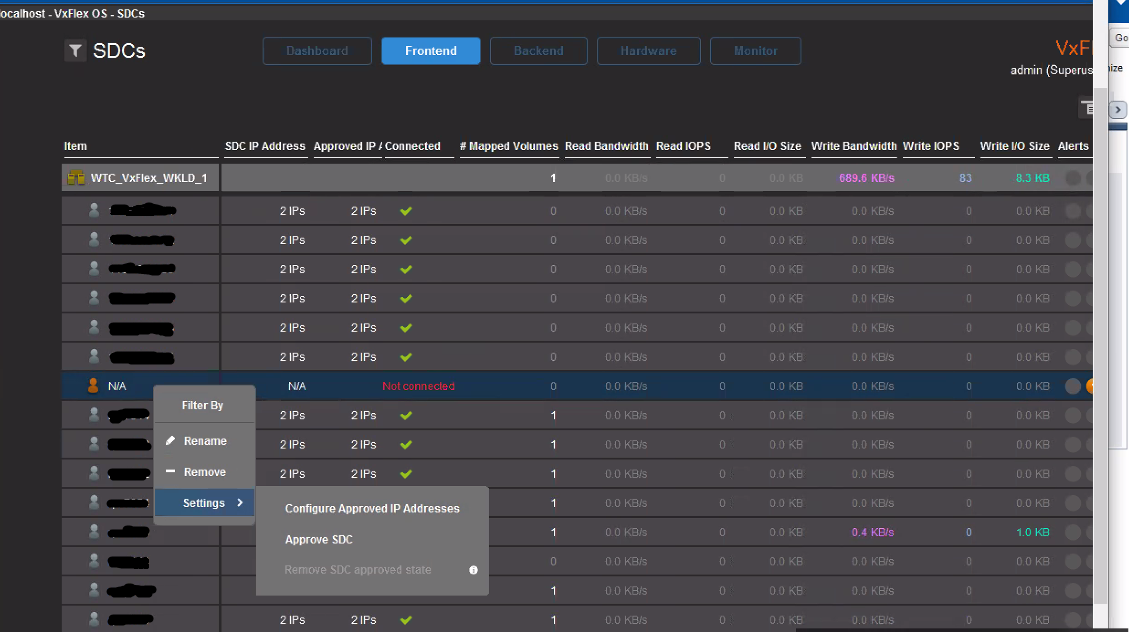
下看到具有 N/A 的新項目 在 N/A 上按一下滑鼠右鍵,依序按一下設定、設定核准的 IP 位址。
輸入您希望 IO 流經的 SDC IP。
輸入 IP 後,您會看到包含您輸入的所有 IP 的項目,並顯示為已連線 (綠色勾號)。
Article Properties
Article Number: 000173533
Article Type: Solution
Last Modified: 22 Aug 2025
Version: 5
Find answers to your questions from other Dell users
Support Services
Check if your device is covered by Support Services.